
iPhone AI Features Explained
Detailed smartphone optimization guide with AI features, creator workflows, battery settings, storage fixes and practical usage tips.
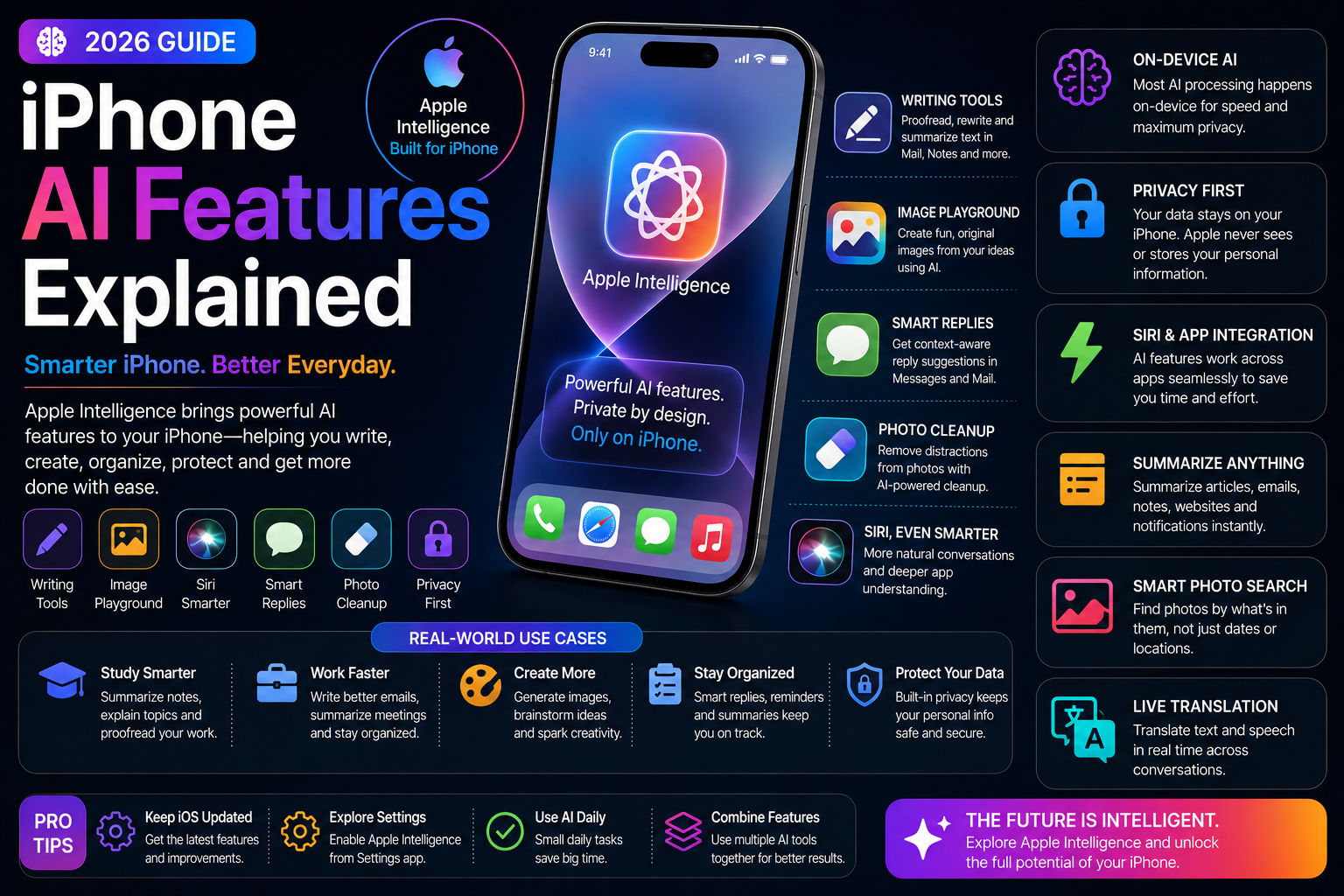
This long-form evergreen smartphone guide focuses on practical real-world usage patterns, creator workflows, AI tools, battery optimization, storage cleanup, privacy protection and performance improvements.
How AI Is Transforming the iPhone Experience
Artificial Intelligence is becoming one of the most important parts of modern smartphones.
Apple is integrating AI deeply into iPhones through Apple Intelligence, smarter Siri interactions, AI-powered productivity tools and privacy-focused machine learning features.
Modern iPhone AI features improve communication, productivity, content creation, photography, organization and everyday usability.
What Is Apple Intelligence?
Apple Intelligence is Apple's AI-powered system designed for iPhone, iPad and Mac devices.
It combines on-device AI processing, contextual understanding and secure cloud-based computing to improve the user experience while maintaining strong privacy protections.
Apple Intelligence focuses heavily on productivity, communication, automation and creator workflows.
- AI-powered productivity tools
- Smarter Siri interactions
- On-device AI processing
- Privacy-focused AI workflows
- Cross-device ecosystem integration
Smarter Siri Features
Siri receives major AI improvements with better conversational understanding and contextual awareness.
Users can interact more naturally while switching between voice and text-based commands.
- Natural conversation support
- Improved contextual understanding
- Cross-app task execution
- Voice and text interaction
- Smarter productivity workflows
AI Writing and Communication Tools
Apple Intelligence introduces AI-powered writing assistance directly into supported apps and workflows.
Users can summarize emails, rewrite messages and improve writing quality more efficiently.
- Email summaries
- AI proofreading
- Tone adjustment
- Writing suggestions
- Quick reply generation
AI Photography and Editing Features
AI-powered camera and editing tools improve photography workflows for both casual users and creators.
Modern iPhones use machine learning for image enhancement, object recognition and editing assistance.
- AI photo cleanup
- Object removal tools
- Smart image enhancement
- Natural language photo search
- Advanced portrait optimization
Smart Notifications and Summaries
AI-powered notification management helps reduce distractions and improve focus.
Important alerts are prioritized while less relevant notifications are summarized intelligently.
- Notification summaries
- Priority alerts
- Reduced information overload
- Smarter app notifications
- Focus Mode integration
AI Features for Content Creators
Creators can use AI-powered tools to improve productivity, editing workflows and content management.
Apple Intelligence helps simplify repetitive tasks and improve organization.
- AI-assisted content planning
- Smart editing workflows
- Productivity improvements
- Media organization tools
- Voice-based creator assistance
Live Text and Visual Lookup
Live Text allows users to copy and interact with text directly from photos and screenshots.
Visual Lookup uses AI to identify objects, landmarks, pets and other visual elements.
- Copy text from images
- Translate text instantly
- Object recognition
- Landmark identification
- Educational lookup workflows
Privacy and AI Security
Apple strongly emphasizes privacy-focused AI processing.
Many AI features run directly on-device, reducing the amount of personal data sent to external servers.
- On-device AI processing
- Private Cloud Compute
- Reduced data sharing
- Enhanced security protections
- Privacy-focused AI architecture
AI Automation and Productivity
AI-powered automation improves workflows for students, professionals and power users.
Apple Intelligence helps users organize schedules, automate tasks and simplify repetitive actions.
- Smart productivity workflows
- AI-assisted automation
- Context-aware suggestions
- Improved Shortcuts integration
- Time-saving workflows
AI Features and Battery Performance
AI processing can affect battery life depending on usage patterns.
Apple optimizes many AI tasks using efficient hardware acceleration and intelligent resource management.
- Efficient neural processing
- Battery-aware AI workflows
- Optimized background activity
- Thermal management improvements
- Performance balancing
AI Features for Students and Professionals
Students and office users benefit from AI-powered productivity, communication and organization tools.
AI features help reduce repetitive work while improving efficiency.
- Study assistance
- Document summarization
- Meeting productivity
- Task organization
- Communication improvements
Future of AI on iPhone
AI will continue becoming a central part of the iPhone experience over the next several years.
Future updates are expected to expand Siri capabilities, creator workflows and intelligent automation systems.
- Deeper ecosystem AI integration
- Advanced Siri improvements
- Smarter contextual workflows
- Expanded creator tools
- More personalized AI experiences
Why iPhone AI Features Matter in 2026
AI is rapidly transforming how users interact with smartphones.
Apple Intelligence and modern iPhone AI features improve productivity, creativity, communication and everyday usability while maintaining strong privacy protections.
Users who understand these AI tools can unlock a significantly smarter and more efficient iPhone experience.
Frequently Asked Questions
What is Apple Intelligence?
Apple Intelligence is Apple's AI-powered system that improves productivity, communication, automation and smartphone usability across Apple devices.
Do all iPhones support Apple Intelligence?
No. Apple Intelligence mainly supports newer iPhone models with advanced hardware capable of efficient AI processing.
Does Apple Intelligence protect privacy?
Yes. Apple emphasizes on-device AI processing and privacy-focused cloud systems designed to minimize unnecessary data sharing.
What are the best AI features on iPhone?
Popular AI features include smarter Siri, AI writing assistance, photo editing tools, notification summaries, Live Text and Visual Lookup.
Can AI features affect battery life?
Some AI features may increase battery usage, but Apple optimizes AI processing using efficient hardware acceleration and intelligent resource management.
Related Reading on Godealio
- Apple Intelligence Features Explained
- Hidden iOS 27 Features You Should Try
- Best Hidden iPhone Features You Should Use
- Best Android AI Features 2026
- Best iPhone Features for Students
- Best iPhone Features for Content Creators
- Pixel AI Features Explained
- Samsung Galaxy AI Features Explained
- Android Features That Beat iPhone
More Guide Details
Author
Godealio Editorial Team
Featured
false