
Gemini AI Features You Should Use
Practical Gemini AI guide covering Android productivity, creator workflows, AI search, summaries, smart assistance, automation and real-world smartphone usage.
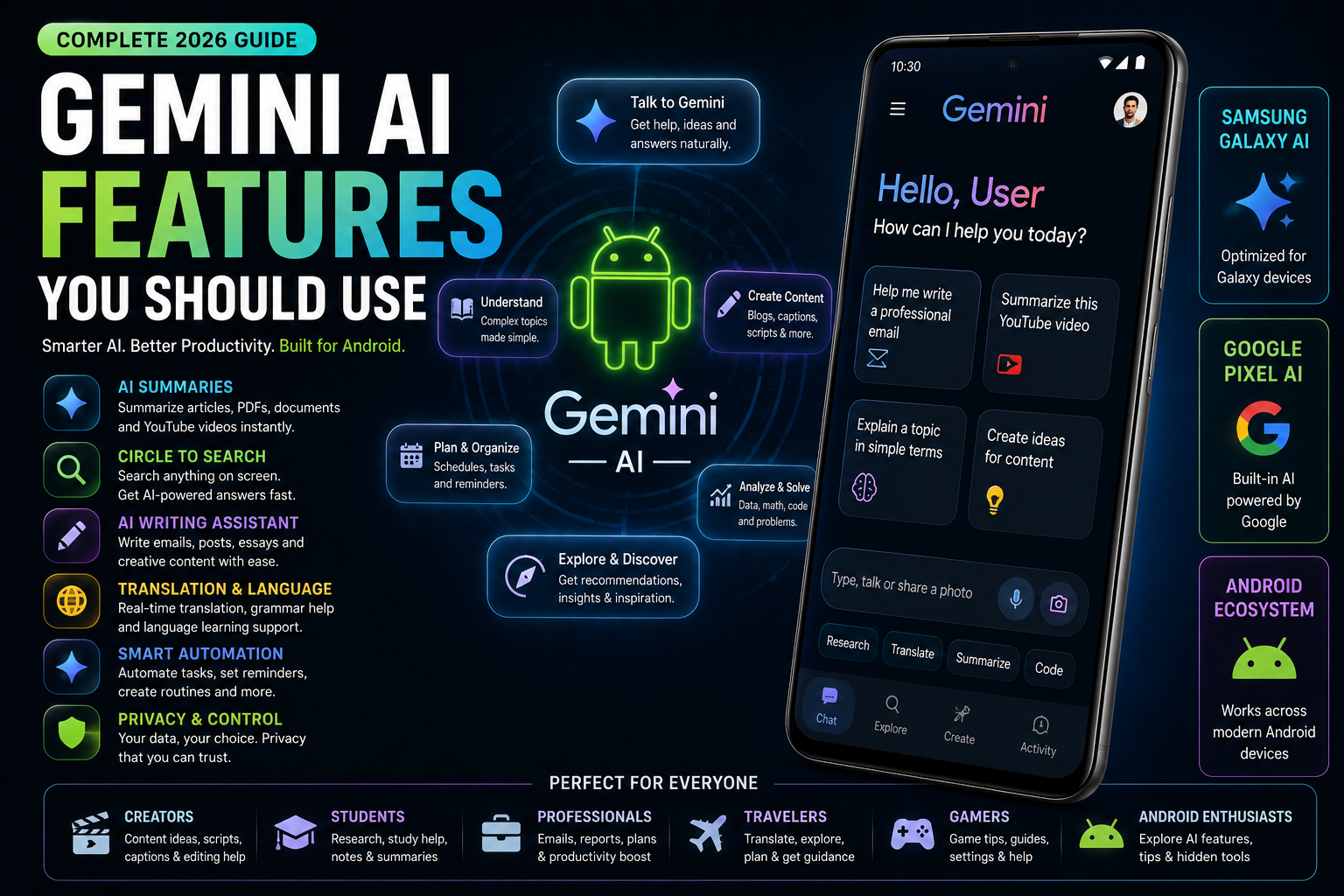
Gemini AI Features You Should Use is a complete 2026 Android AI guide focused on practical Gemini workflows that genuinely improve productivity, creativity and smartphone usability. This guide explains Gemini AI features for creators, students, office users, travelers, gamers and Android enthusiasts. It covers AI summaries, Circle to Search integration, productivity assistance, translation tools, creator workflows, AI writing support, smart automation, voice interaction and privacy considerations across Samsung Galaxy AI, Google Pixel AI and modern Android ecosystems.
Quick Verdict
Main rule: Gemini becomes most useful when it saves time during daily workflows instead of being treated like a novelty feature.
Best for: Students, creators, office users, travelers, multitaskers and Android users interested in AI productivity.
Avoid if: You expect AI to completely replace human decision-making or work perfectly offline.
Best by Use Case
Students
Gemini summaries and AI explanations help simplify research and studying workflows.
Creators
Gemini helps brainstorm titles, captions, scripts and thumbnail ideas faster.
Office users
AI summaries and scheduling support improve productivity significantly.
Travel
Translation, travel planning and contextual search improve convenience.
Shopping
Gemini combined with Circle to Search improves product research and comparisons.
Comparison Advice
- Gemini focuses more on conversational AI workflows than traditional assistants.
- Pixel and Samsung flagship phones currently provide the best Gemini integrations.
- AI productivity features matter more daily than many benchmark upgrades.
- The most useful AI features are usually simple workflow improvements.
Mistakes to Avoid
- Uploading sensitive documents carelessly
- Expecting perfect AI accuracy
- Relying completely on AI-generated information
- Leaving unnecessary AI permissions enabled
- Using unknown third-party AI apps
- Ignoring battery impact of continuous AI usage
Deal Advice
- Phones with stronger processors and more RAM handle AI tasks more smoothly.
- Flagship Android devices usually receive better AI feature support.
- Large displays improve Gemini multitasking workflows significantly.
- Creators benefit more from storage and thermal management alongside AI features.
Why Gemini AI Matters in 2026
Gemini represents a major shift in how Android smartphones handle productivity and search.
Instead of only responding to commands, Gemini tries to understand context, workflows and natural conversations.
The feature becomes especially useful when integrated deeply into Android multitasking and search systems.
How Gemini Differs From Older Voice Assistants
Older smartphone assistants focused mainly on voice commands and basic automation.
Gemini focuses more on contextual understanding, summaries, planning and natural interaction.
This makes it feel more useful for productivity and creator workflows.
AI Summaries Are One of Gemini’s Most Useful Features
Gemini can summarize articles, notes, screenshots and information much faster than manual reading.
Students and office users especially benefit from faster information processing.
- Article summaries
- Meeting notes
- Research simplification
- Screenshot explanations
- Quick information breakdowns
Gemini and Circle to Search Work Extremely Well Together
Gemini becomes even more practical when combined with Circle to Search workflows.
Users can instantly search products, diagrams, screenshots and objects directly from the screen.
- Product identification
- Instant translations
- Shopping comparisons
- Visual AI search
- Creator workflow research
Gemini Features for Creators
Creators increasingly use Gemini to speed up brainstorming, captions and content planning.
AI assistance reduces repetitive tasks while helping creators stay organized.
- Caption suggestions
- Thumbnail title ideas
- Script brainstorming
- Content planning
- AI productivity workflows
Best Gemini Features for Students
Students use Gemini heavily for explanations, summarization and organization.
The AI system reduces friction during research and revision.
- Simplified explanations
- Study planning
- Language translation
- Homework organization
- Quick note summaries
Travel and Translation Features
Gemini improves travel convenience through contextual search and smarter translation workflows.
Travelers can quickly understand signs, menus and screenshots.
- Menu translation
- Travel planning
- Real-time explanations
- Language assistance
Gemini for Office and Productivity Workflows
Office users benefit from AI assistance during meetings, emails and scheduling.
Gemini helps reduce repetitive workflow friction significantly.
- AI writing support
- Meeting summaries
- Task organization
- Productivity assistance
Gemini for Gaming and Entertainment
Gaming users increasingly use Gemini for strategy lookup, quick search and multitasking support.
AI search is faster than traditional browser switching during gameplay.
- Game guide search
- Quick troubleshooting
- Strategy explanations
- Fast contextual lookup
Gemini Privacy and Security Concerns
Gemini processes large amounts of contextual information and often relies on cloud systems.
Users should understand what data is processed locally versus remotely.
- Review AI permissions
- Avoid uploading sensitive data
- Use trusted ecosystems
- Understand cloud-processing risks
Battery and Performance Impact
AI systems consume additional processing power, especially during cloud-assisted tasks.
Heavy Gemini usage can increase battery drain on older devices.
- Use adaptive battery tools
- Avoid unnecessary background AI activity
- Monitor AI-related battery usage
How Gemini Is Changing Android AI
Gemini represents Android’s transition toward more conversational and contextual AI experiences.
Future Android workflows will likely integrate AI assistance even more deeply into daily tasks.
Which Gemini Features Are Actually Worth Using?
The most useful Gemini features are usually simple productivity improvements instead of flashy demos.
AI summaries, contextual search and quick explanations provide the biggest real-world benefits.
The Future of Gemini AI
Gemini will likely evolve into a more proactive assistant capable of anticipating workflows and improving multitasking automatically.
Privacy and battery optimization will become increasingly important as AI integration expands.
Final Verdict
Gemini AI becomes most valuable when integrated naturally into daily Android workflows.
Students, creators and productivity-focused users benefit the most from modern Gemini features.
AI-powered search, summaries and contextual assistance are becoming major reasons many users prefer modern Android ecosystems.
Frequently Asked Questions
What is Gemini AI on Android?
Gemini is Google’s AI assistant platform focused on contextual search, summaries and conversational productivity workflows.
Which phones support Gemini AI?
Google Pixel and Samsung Galaxy flagship devices currently provide the strongest Gemini AI integration.
Does Gemini AI require internet?
Many Gemini features rely on cloud processing and internet connectivity for advanced AI tasks.
Is Gemini useful for creators?
Yes. Creators use Gemini for captions, brainstorming, planning and workflow assistance.
Does Gemini affect battery life?
Heavy AI usage can increase battery consumption, especially on older devices.
Are there privacy risks with Gemini AI?
Users should review permissions carefully and avoid uploading highly sensitive information to AI systems.
Related Reading on Godealio
- Best Android AI Features in 2026
- Circle to Search Explained
- Best Android Apps for Productivity
- Best AI phones
- Compare phones
- Latest mobile offers
- Best Hidden iPhone Features You Should Use
- Camera Features You Should Actually Use
- What Is eSIM And Should You Use It
- AI Features You'll Use Every Day
- Hidden iOS 27 Features You Should Try
- Redmi 13 5G Review: Should You Buy It in India?
More Guide Details
Article Type
evergreen_ai_guide
Platform
Android
Featured
true