
Circle to Search Explained
Practical Android AI guide covering Circle to Search usage, shopping workflows, creator tools, translations, productivity tricks and real-world smartphone usage.
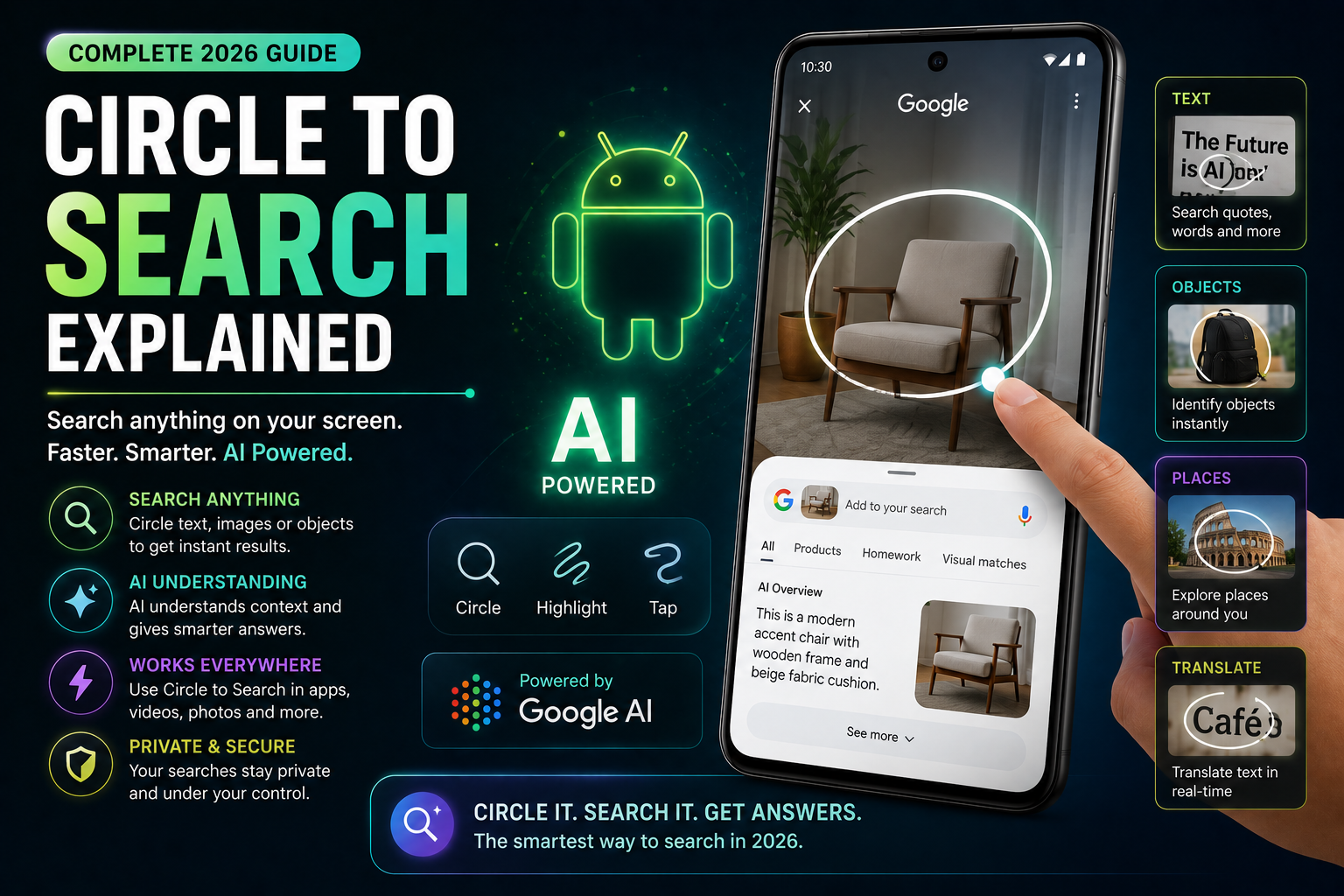
Circle to Search Explained is a complete 2026 Android AI guide focused on one of the most practical smartphone features introduced in recent years. This guide explains how Circle to Search works, supported Android devices, shopping workflows, creator usage, translation features, AI-powered search, gaming support and productivity benefits. It also covers battery impact, privacy considerations, AI integrations and real-world use cases for Samsung Galaxy AI, Google Pixel AI and other Android ecosystems.
Quick Verdict
Main rule: Circle to Search is useful because it reduces app switching and makes visual search much faster during real daily usage.
Best for: Students, creators, shoppers, travelers, gamers and Android users who multitask heavily.
Avoid if: You rarely use search tools or prefer traditional browser-based workflows.
Best by Use Case
Shopping
Circle products directly from Instagram, YouTube or websites to compare prices instantly.
Creators
Use Circle to Search to identify creator tools, editing styles and gadgets quickly.
Students
Circle difficult terms, diagrams and screenshots for instant explanations.
Travel
Translate menus, signs and text directly from the screen instantly.
Gaming
Search game characters, settings and guides without leaving gameplay entirely.
Comparison Advice
- Circle to Search is faster than manually switching between apps and browsers.
- Samsung Galaxy AI and Pixel AI currently provide the best Circle to Search experiences.
- The feature is more practical than many voice assistants for visual tasks.
- AI-powered search is becoming a major smartphone productivity advantage.
Mistakes to Avoid
- Expecting perfect search accuracy every time
- Using the feature continuously during gaming
- Ignoring privacy permissions
- Assuming all devices support the feature
- Using outdated Android versions
- Leaving excessive background AI features enabled
Deal Advice
- Flagship Android phones currently provide smoother AI search experiences.
- Samsung Galaxy and Pixel devices receive the strongest AI feature support.
- Good internet connectivity improves AI search quality significantly.
- Larger displays improve Circle to Search usability during multitasking.
What Is Circle to Search?
Circle to Search is an Android AI feature that allows users to search anything visible on the screen instantly without switching apps.
Users can circle, tap or highlight objects, products, text or images directly on the display to trigger contextual AI search results.
The feature combines visual recognition, AI understanding and Google Search integration into a much faster workflow.
Why Circle to Search Became Popular
The feature became popular because it solves a real smartphone problem: constant app switching.
Instead of taking screenshots or opening browsers manually, users can instantly search objects directly from the current screen.
How to Use Circle to Search
Circle to Search is designed to work naturally with gestures and visual interaction.
The exact activation method depends on Android version and device brand.
- Long-press navigation bar or gesture handle
- Circle products or text directly
- Tap highlighted objects
- View AI-powered search suggestions
- Translate or compare instantly
Circle to Search for Shopping and Price Comparisons
Shopping is one of the strongest real-world use cases for Circle to Search.
Users can instantly identify products seen in reels, YouTube videos, ads or social posts.
- Search products from Instagram
- Compare gadget prices quickly
- Identify fashion accessories
- Check smartphone models instantly
- View related shopping suggestions
How Creators Use Circle to Search
Creators frequently use Circle to Search to identify editing setups, lighting gear, microphones and creator accessories.
It also helps creators quickly research trends while browsing social platforms.
- Identify editing tools
- Research camera gear
- Analyze creator setups
- Find trending products
- Explore thumbnail styles
Circle to Search for Students and Productivity
Students benefit heavily from visual search because diagrams, notes and screenshots can be analyzed instantly.
The feature reduces the friction of manual searching during studying.
- Search difficult concepts
- Translate screenshots
- Understand diagrams
- Research formulas quickly
Translation and Travel Workflows
Travelers can translate menus, signs and screenshots directly using Circle to Search.
This dramatically improves convenience during travel and international communication.
- Menu translation
- Signboard understanding
- Real-time language assistance
- Travel information lookup
Circle to Search for Gaming
Gamers increasingly use Circle to Search to identify characters, guides and settings while playing.
This reduces the need to leave games entirely for browser searches.
- Search game strategies
- Identify game items
- Quick settings research
- Character lookup
Which Phones Support Circle to Search?
The feature initially launched on flagship Samsung Galaxy and Google Pixel devices.
Support is gradually expanding across newer Android ecosystems.
- Samsung Galaxy AI phones
- Google Pixel devices
- Selected flagship Android models
- Future AI-focused phones
Privacy and AI Concerns
Circle to Search relies on AI processing and search integration.
Users should understand what information may be processed locally versus through cloud systems.
- Review AI permissions
- Understand cloud search processing
- Avoid sensitive document searches
- Use trusted Android ecosystems
Battery and Performance Impact
Circle to Search itself does not heavily impact battery life during occasional usage.
However, constant AI processing and background assistant features can increase power usage.
- Disable unnecessary AI background tools
- Monitor AI battery usage
- Use adaptive battery settings
Why Android AI Features Feel Ahead Here
Circle to Search highlights Android’s advantage in flexible AI integrations.
The feature feels deeply connected to multitasking and visual workflows instead of traditional assistant commands.
The Future of Visual AI Search
Visual AI search is likely to become a major part of future smartphone usage.
Future versions may integrate deeper shopping, productivity and contextual AI workflows.
Final Verdict
Circle to Search is one of the most practical Android AI features because it improves everyday workflows naturally.
The feature is especially valuable for shopping, creators, students and multitasking users.
AI-powered visual search is becoming a major reason many users prefer modern Android ecosystems.
Frequently Asked Questions
What is Circle to Search?
Circle to Search is an Android AI feature that lets users search objects, text or products directly from the screen.
Which phones support Circle to Search?
Samsung Galaxy AI phones and Google Pixel devices currently provide the strongest support.
Does Circle to Search require internet?
Yes. Most visual AI search functions rely on internet connectivity and cloud processing.
Is Circle to Search useful for shopping?
Yes. It is extremely useful for identifying products and comparing prices quickly.
Does Circle to Search affect battery life?
Occasional usage has limited impact, but heavy AI usage can increase battery consumption.
Can Circle to Search translate text?
Yes. The feature can help translate visible text and screenshots directly from the screen.
Related Reading on Godealio
- Best Android AI Features in 2026
- Android Features That Beat iPhone
- Best Android Apps for Productivity
- Best AI phones
- Compare phones
- Latest mobile offers
- Circle to Search vs ChatGPT Search
- iPhone AI Features Explained
- Samsung Galaxy S26 vs Galaxy S26 Plus: Display, Battery, Camera and Price Difference Explained
- Apple Intelligence Features Explained
- LPDDR4X Vs LPDDR5 RAM Explained
- Pixel AI Features Explained
More Guide Details
Article Type
evergreen_ai_feature_guide
Platform
Android
Featured
true