
Best iPhone Video Recording Settings
Detailed smartphone optimization guide with AI features, creator workflows, battery settings, storage fixes and practical usage tips.
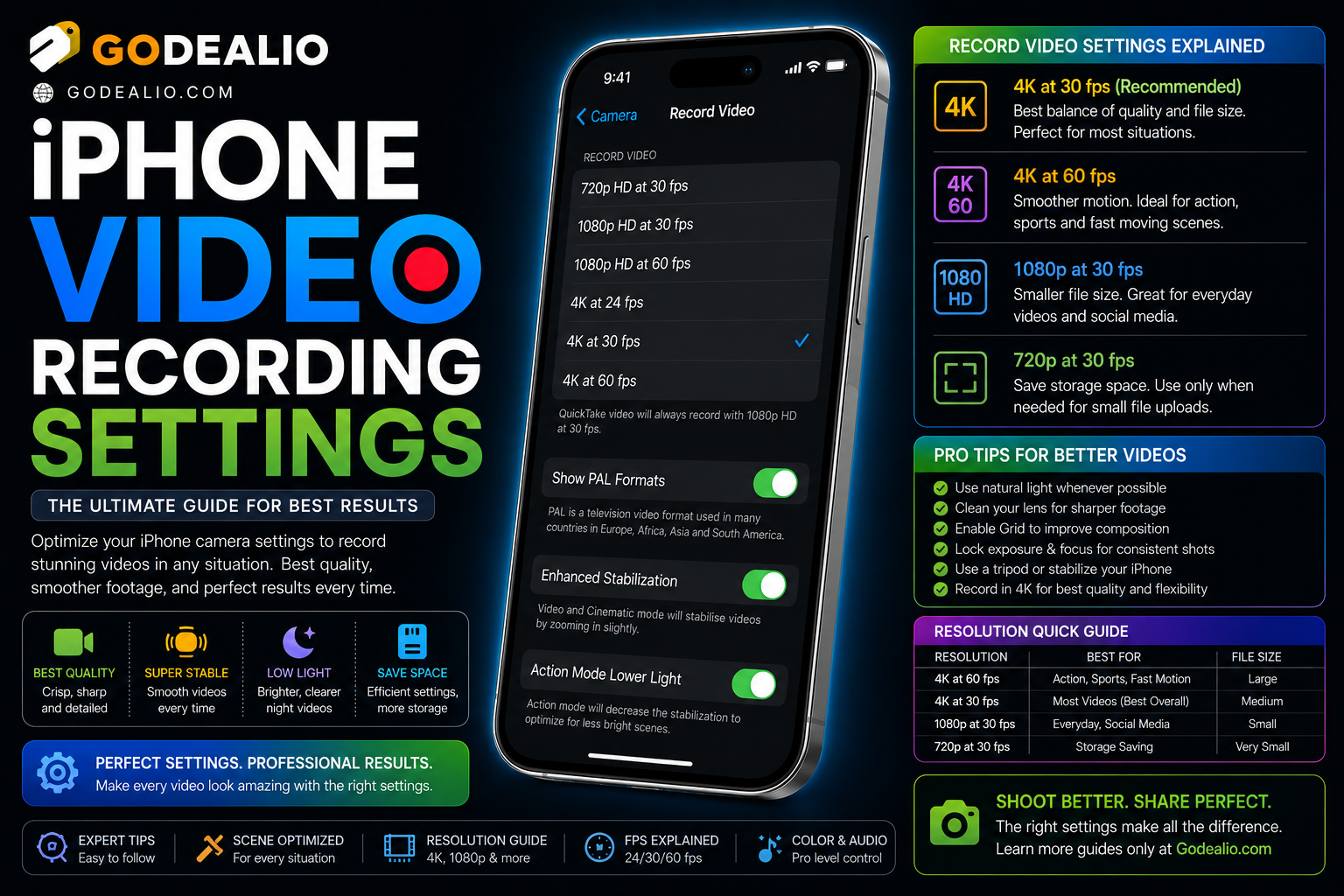
This long-form evergreen smartphone guide focuses on practical real-world usage patterns, creator workflows, AI tools, battery optimization, storage cleanup, privacy protection and performance improvements.
Why iPhone Video Settings Matter
Modern iPhones are among the most powerful mobile video creation tools available today.
The right recording settings can dramatically improve video quality, storage efficiency, stabilization and creator workflows.
Whether recording YouTube videos, Instagram Reels, TikToks, travel content or cinematic footage, optimized settings help creators get professional results directly from iPhone.
Choose the Right Resolution and Frame Rate
Resolution and frame rate settings directly affect video quality, smoothness and storage usage.
Different creator workflows require different recording combinations depending on platform and editing style.
- 4K 30fps for balanced quality and storage
- 4K 60fps for smooth cinematic motion
- 1080p for social media efficiency
- 24fps for cinematic-style videos
- 60fps for action and sports recording
Use Cinematic Mode Properly
Cinematic Mode adds depth effects and automatic focus transitions to videos.
This feature helps creators achieve professional-looking footage without external cameras.
- Background blur effects
- Automatic subject focus
- Professional storytelling workflows
- Great for interviews and vlogs
- Useful for Instagram Reels and YouTube Shorts
ProRes and Log Recording
ProRes recording is designed for advanced creators who need maximum editing flexibility.
Log recording improves color grading workflows and dynamic range during post-production.
- Professional editing workflows
- Better color grading
- Higher dynamic range
- External SSD support
- Improved post-production flexibility
Improve Video Stabilization
Stabilization settings help reduce shaky footage while walking, traveling or filming handheld content.
Modern iPhones include excellent optical and software stabilization features.
- Action Mode stabilization
- Optical image stabilization
- Smooth handheld footage
- Travel and vlog optimization
- Improved motion control
Optimize Audio Recording
Good audio quality is essential for professional content creation.
Creators should optimize microphone settings and use external audio accessories when possible.
- Stereo audio recording
- Wireless microphone support
- Noise reduction improvements
- Voice clarity optimization
- Podcast and interview workflows
Lighting Tips for Better Video Quality
Lighting dramatically affects smartphone video quality.
Even basic lighting improvements can make iPhone footage look more professional.
- Use natural lighting when possible
- Avoid harsh backlighting
- Improve indoor lighting setups
- Use portable creator lights
- Optimize low-light recording
Apple Intelligence and Video Workflows
Apple Intelligence introduces AI-powered productivity tools that can help creators organize projects, improve workflows and streamline content management.
AI summaries, smarter Siri interactions and automation tools improve creator productivity.
- AI-assisted creator workflows
- Smart productivity management
- Improved content organization
- Voice-based workflow control
- Faster editing preparation
Manage Video Storage Efficiently
High-quality video recording can quickly consume iPhone storage.
Creators should optimize storage workflows to avoid interruptions during filming.
- Use HEVC compression
- Transfer files regularly
- Use external SSD storage
- Optimize iCloud storage
- Delete unnecessary duplicate footage
Battery and Thermal Management
Long video recording sessions can generate heat and drain battery quickly.
Optimized settings help improve recording stability and battery efficiency.
- Reduce screen brightness while filming
- Use certified charging accessories
- Avoid overheating in sunlight
- Manage background apps
- Use power-efficient creator workflows
Best Accessories for iPhone Video Recording
Accessories can dramatically improve video quality and creator productivity.
Lighting, microphones and stabilization tools are especially useful.
- Wireless microphones
- Portable creator lights
- Tripods and stabilizers
- External SSD storage
- MagSafe creator mounts
Privacy and Creator Security
Creators often store sensitive content, client footage and unpublished projects on their devices.
Privacy settings and backup workflows help protect creator assets.
- Secure cloud backups
- Protect creator files
- Manage app permissions
- Use encrypted storage
- Enable Face ID security
Record Better Videos with Your iPhone
Modern iPhones are capable of producing professional-quality video content with the right settings and workflows.
Optimizing video settings, stabilization, audio and storage can significantly improve creator results.
Small adjustments can dramatically improve cinematic quality, social media content and overall creator productivity.
Frequently Asked Questions
What are the best iPhone video recording settings?
4K 30fps or 4K 60fps are generally the best settings for high-quality video recording, depending on storage and creator needs.
Should creators use ProRes on iPhone?
ProRes is useful for advanced creators who need professional editing flexibility and color grading workflows.
What is Cinematic Mode on iPhone?
Cinematic Mode adds background blur and automatic focus transitions to create more cinematic-looking videos.
How can I reduce shaky iPhone videos?
Use Action Mode stabilization, tripods, gimbals and smoother handheld movement techniques.
Does 4K video use more battery and storage?
Yes. Higher resolutions and frame rates consume significantly more battery power and storage space.
Related Reading on Godealio
- Best iPhone Features for Content Creators
- Best Hidden iPhone Features You Should Use
- Apple Intelligence Features Explained
- Android Camera Tricks
- Best Phones For Video Recording
- Best iPhone Settings for Privacy
- Best iPhone Battery Saving Settings
- Best iPhone To Buy
- iPhone 17 Pro Max vs Samsung Galaxy S26 Ultra: Camera, Video, Battery and AI Flagship Battle
- iPhone 16 vs iPhone 17: Camera, Battery, Performance and Upgrade Guide
More Guide Details
Author
Godealio Editorial Team
Featured
false
Best Settings for Social Media Creators
Different social media platforms require different recording approaches.
Creators should optimize aspect ratio, frame rate and editing workflows for each platform.