
Apple Explains How iOS 27 Photos AI Helps Users Create More Natural Photo Edits
Apple says its new iOS 27 Photos AI tools are designed to enhance memories naturally rather than dramatically altering them, focusing on intelligent editing, composition improvements and privacy-first processing.
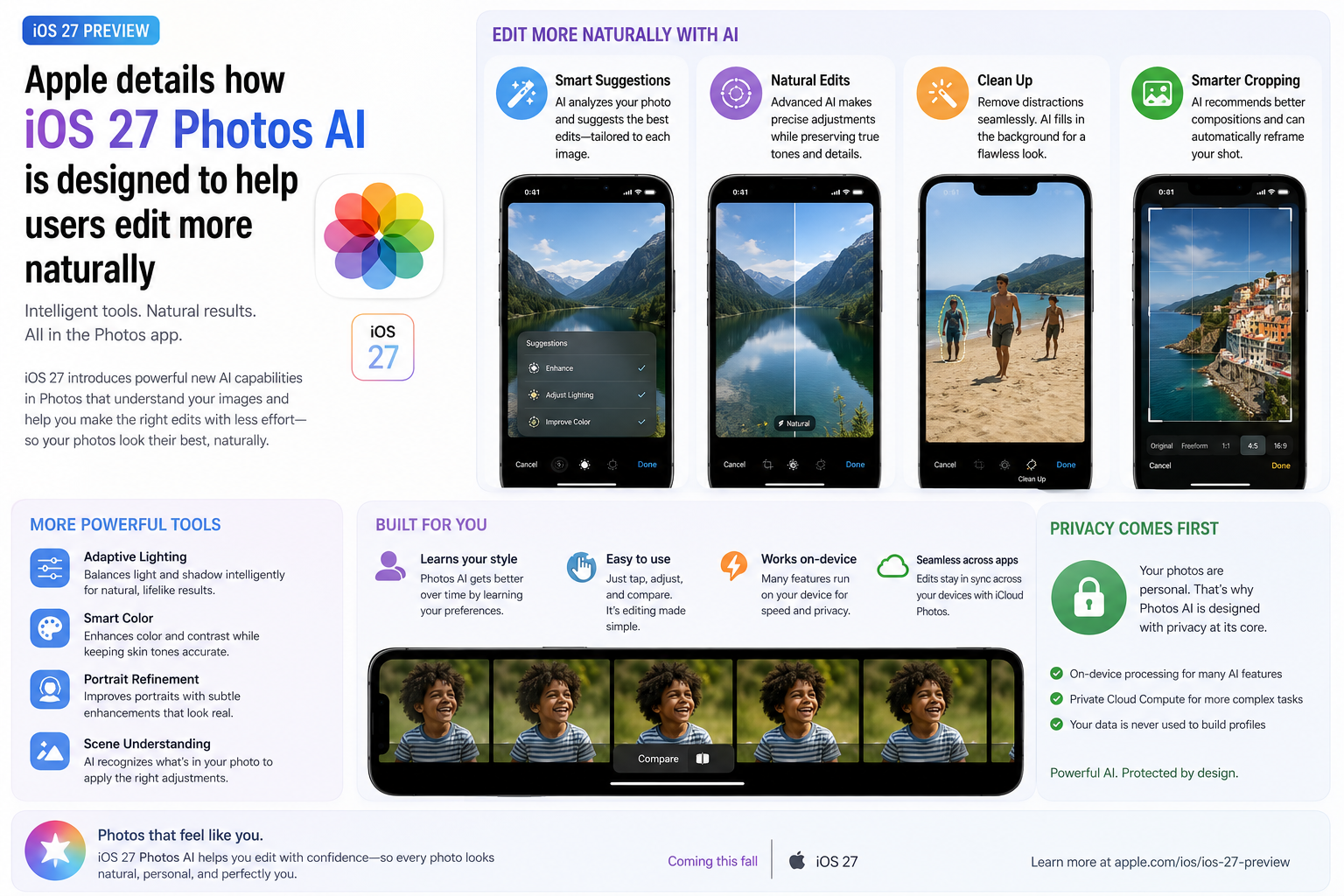
Apple has revealed additional details about the AI-powered editing features coming to the Photos app in iOS 27. Rather than creating unrealistic images or heavily manipulating memories, Apple says its goal is to help users improve existing photos in a natural and intuitive way. New tools such as Reframe and Extend use Apple Intelligence to improve composition, recover missing framing and make photo adjustments feel more realistic. The company emphasizes that AI should assist users instead of replacing their creative decisions. Combined with on-device processing and privacy-focused design, iOS 27 Photos aims to make everyday photo editing faster, smarter and more accessible for millions of iPhone users.
Brand
Apple
Model
iOS 27 Photos AI
Topic
Apple Intelligence
Content Type
news
Launch Status
Developer Beta
Availability
Expected Public Rollout Later 2026
Rating
9.2
Pros
- Natural AI-powered photo editing
- Improved composition with Reframe
- Extend can intelligently expand image borders
- Privacy-focused Apple Intelligence integration
- On-device processing for many AI tasks
- Simple editing workflow for beginners
- Works directly inside Photos app
- Useful for creators and casual users alike
Cons
- Some advanced AI tools may require newer iPhones
- Features are currently in beta
- Performance may vary between devices
- Global rollout will take time
Final Verdict
Apple's approach to AI photo editing appears more practical than flashy. Rather than generating unrealistic content, iOS 27 Photos focuses on helping users improve real photos with intelligent suggestions and natural-looking enhancements. If Apple delivers on its promise, these tools could become some of the most useful Apple Intelligence features available on iPhone.
Apple Wants AI to Enhance Photos, Not Replace Memories
Apple says its new AI-powered editing tools are designed to help users improve photos while preserving authenticity.
Instead of aggressively altering images, the company wants Apple Intelligence to act like a smart assistant that helps users make better editing decisions.
The goal is to keep photos looking realistic while reducing the effort required to achieve professional-looking results.
What Is Reframe?
Reframe is one of the headline additions in iOS 27 Photos.
The feature analyzes a photo and suggests improved composition by intelligently repositioning the subject within the frame.
It can help users create more balanced images without manually cropping and adjusting every shot.
- Improves photo composition
- Suggests better framing automatically
- Highlights the main subject
- Useful for portraits and landscapes
- Designed to preserve image quality
How Extend Expands Photos
Extend uses generative AI techniques to intelligently fill missing areas around an image.
Users can expand the edges of a photo when they need extra space for cropping, social media posts or wallpapers.
Apple says the feature is designed to create seamless results that match the original image naturally.
- Expands image borders
- Fills missing background details
- Helps create wallpapers
- Useful after cropping
- Integrated directly into Photos
Privacy Remains a Major Focus
Apple continues to emphasize privacy as a key part of Apple Intelligence.
Many AI-powered editing tasks run directly on-device, reducing the need to send personal photos to external servers.
More demanding tasks may use Apple's Private Cloud Compute infrastructure while maintaining strong privacy protections.
Why Creators and Casual Users Will Benefit
Professional creators can save time when preparing content for social media, websites and marketing campaigns.
Casual users benefit from automatic suggestions that make family photos, vacation images and everyday pictures look better with minimal effort.
- Faster editing workflow
- Improved social media content
- Better photo composition
- Less manual editing
- Cleaner image presentation
- Beginner-friendly tools
Apple Intelligence Continues to Expand
The new Photos capabilities are part of Apple's broader Apple Intelligence strategy.
Across iOS 27, Apple is adding AI-powered tools to messaging, productivity, image editing and device personalization.
The company appears focused on practical AI features that users can benefit from every day.
Expected Device Support
Some AI-powered Photos features will likely require newer Apple silicon and recent iPhone hardware.
Apple is expected to publish a full compatibility list closer to the public release.
- iPhone 17 Series
- iPhone 18 Series
- Recent Apple Silicon iPads
- Compatible Apple Intelligence devices
- Future Apple hardware
A Smarter and More Helpful Photos App
Apple's latest Photos enhancements focus on solving real editing problems instead of simply showcasing AI capabilities.
If the final release performs as promised, Reframe and Extend could become some of the most frequently used Apple Intelligence tools available in iOS 27.
FAQs
What is Reframe in iOS 27 Photos?
Reframe is an AI-powered editing tool that improves image composition by intelligently adjusting how the subject is positioned within a photo.
What does Extend do?
Extend can expand the borders of an image and generate additional content that matches the original scene.
Does Apple Photos AI use cloud processing?
Many features run directly on-device, while more demanding tasks may use Apple's Private Cloud Compute infrastructure.
Will older iPhones support these features?
Some advanced Apple Intelligence capabilities may require newer iPhone hardware.
When will iOS 27 Photos AI be available?
The features are currently in beta and are expected to reach eligible users later in 2026.
Can AI completely change my photos?
Apple says its goal is to improve photos naturally rather than dramatically alter memories or create unrealistic results.