News / iPhone Tips

Hidden iPhone Camera Feature Lets You Copy and Paste Photo Edits Across Multiple Photos

This useful iPhone Photos trick helps users apply the same edit style to many pictures at once, saving time after trips, events and social media shoots.
Published: 2026-05-31T04:30:00+00:00Updated: 2026-05-31T04:30:00+00:00
Hidden iPhone Camera Feature Lets You Copy and Paste Photo Edits Across Multiple Photos

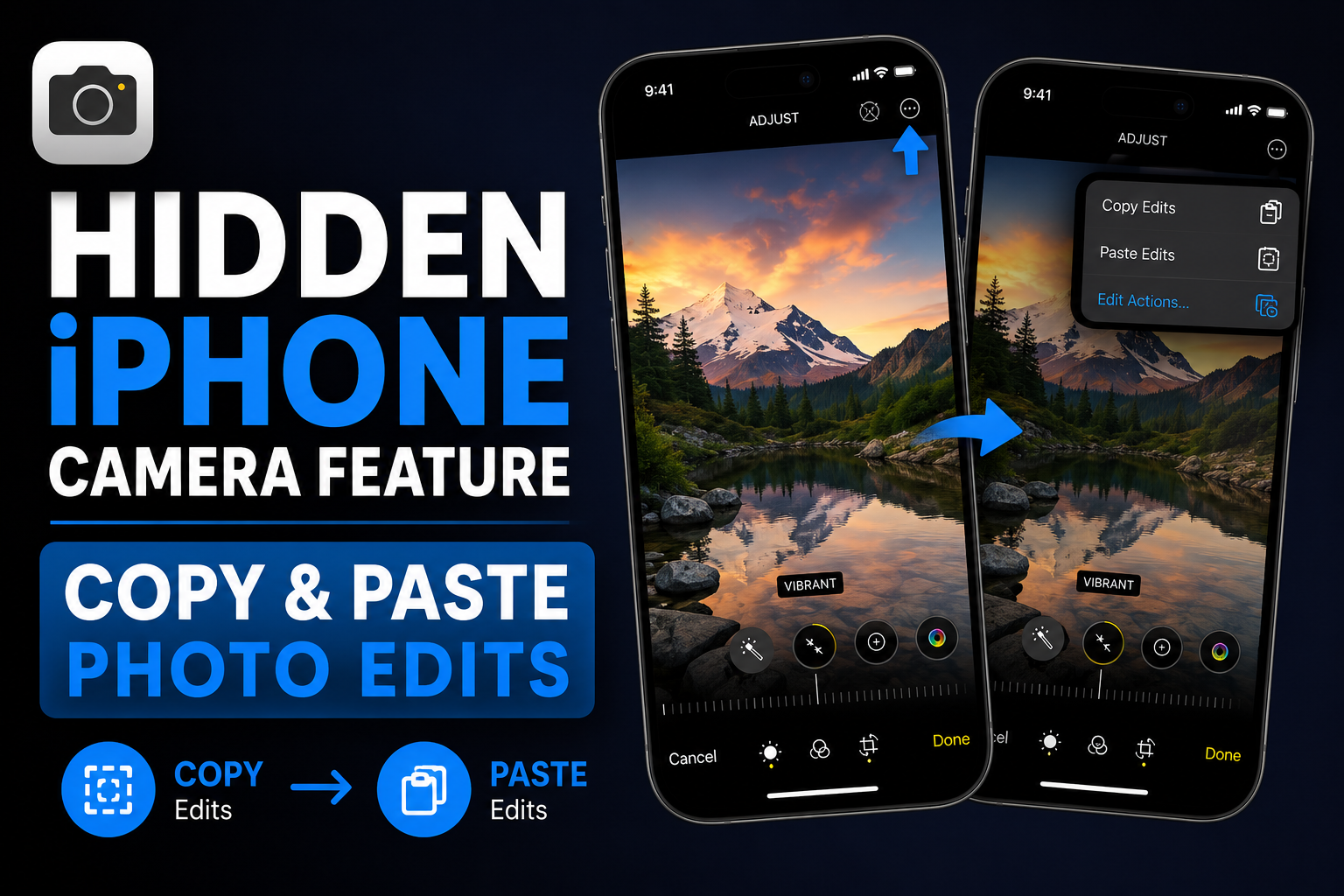
A lesser-known iPhone Photos feature lets users copy edits from one edited photo and paste them onto another photo or even multiple images at once. The feature is useful for batch editing travel shots, event photos, Instagram posts and pictures taken under the same lighting conditions.

Brand

Apple

Model

iPhone Photos

Pros

  • Saves time when editing many photos
  • Great for Instagram and travel albums
  • Keeps photo style consistent
  • Easy to use inside the Photos app
  • No third-party app required

Cons

  • Not ideal for photos with different lighting
  • Some images may still need manual correction
  • Feature is easy to miss in the Photos app menu
  • Not as advanced as professional editing tools

Why This Hidden iPhone Feature Matters

Many iPhone users edit photos one by one without realizing Apple already includes a faster batch-editing workflow inside the Photos app.

The copy-and-paste edits feature lets users apply the same look across multiple photos, which is especially useful when several images were taken in the same lighting or location.

For creators, travellers and social media users, this can save a lot of time.

How Copy and Paste Photo Edits Works

After editing one photo, users can open the menu, choose Copy Edits, and then apply those same edits to another image.

The feature can also be used on multiple selected photos, making it helpful for batch editing.

This means changes like exposure, contrast, highlights, shadows, saturation and other adjustments can be reused quickly.

  • Edit one photo first
  • Copy the edits from the menu
  • Select one or multiple photos
  • Paste the copied edits
  • Review final images and adjust if needed

Best Use Cases

This feature is most useful when several photos share the same lighting and colour conditions.

For example, photos from the same restaurant, beach, event, sunset or indoor shoot can be edited consistently with one copied adjustment set.

  • Travel photo albums
  • Wedding and event photos
  • Instagram carousel posts
  • Food photography
  • Product photos
  • Family albums

Why Creators Should Use It

Creators often need a consistent visual style across multiple images.

Instead of repeating the same edits manually, this iPhone Photos shortcut makes it easier to create a unified look for Instagram, blogs, thumbnails and social posts.

It is not a replacement for professional editing apps, but it is fast enough for everyday content workflows.

What to Keep in Mind

Copied edits may not look perfect on every photo.

If some images have different lighting, skin tones or backgrounds, the pasted edits may need small manual adjustments.

The feature works best when photos are visually similar.

Godealio Tip

Use copy-and-paste edits after picking one photo as your reference style.

Edit that photo carefully first, then apply the same look to the rest of the batch.

This gives your album or social media post a cleaner and more professional feel.

FAQs

Can iPhone copy photo edits to multiple photos?

Yes. After editing one photo, users can copy the edits and paste them onto one or multiple photos from the Photos app.

Where is the Copy Edits option on iPhone?

Open an edited photo in the Photos app, tap the menu button, and choose Copy Edits.

Is this useful for Instagram photos?

Yes. It helps keep colours, brightness and tone consistent across Instagram posts and carousel images.

Does it work on all photos perfectly?

No. It works best when photos have similar lighting and composition. Some photos may need small manual adjustments.

Do I need a third-party app for this?

No. The feature is built into Apple’s Photos app.

Tags

Apple iPhone PhotosAppleiPhone PhotosiPhone TipsHidden iPhone CameraiPhone Camera FeatureCamera Feature LetsFeature Lets CopyLets Copy PasteCopy Paste Photo

SEO Keywords

Apple iPhone PhotosAppleiPhone PhotosiPhone TipsHidden iPhone CameraiPhone Camera FeatureCamera Feature LetsFeature Lets CopyLets Copy PasteCopy Paste PhotoPaste Photo EditsPhoto Edits AcrossEdits Across MultipleAcross Multiple PhotosHidden iPhone

SEO Metadata

Meta TitleHidden iPhone Camera Feature Lets You Copy and Paste Photo Edits
Meta DescriptionThis hidden iPhone Photos feature lets users copy photo edits and paste them across multiple images. Learn how it helps with travel photos, Instagram posts and batch editing.
Keywords["hidden iPhone camera feature","copy paste photo edits iPhone","iPhone Photos copy edits","batch edit photos iPhone","iPhone camera tips","iPhone photo editing trick","copy edits in Photos app","iPhone Instagram photo editing","iPhone hidden features","Apple Photos tips"]
Focus KeywordApple iPhone Photos
Schema TypeNewsArticle

Recommended Buying Options

Check current prices, stock availability, specifications and buy from trusted sellers.

Apple iPhone Air 1 TB: Thinnest iPhone Ever, 16.63 cm (6.5″) Display with Promotion up to 120Hz, Powerful A19 Pro Chip, Center Stage Front Camera, All-Day Battery Life; Space Black

Amazon

Apple iPhone Air 1 TB: Thinnest iPhone Ever, 16.63 cm (6.5″) Display with Promotion up to 120Hz, Powerful A19 Pro Chip, Center Stage Front Camera, All-Day Battery Life; Space Black

₹1,41,900.00₹1,59,900

In stock

View Deal
Key Specifications
Manufacturer‎Apple
Country of Origin‎India
Item model number‎MG2W4HN/A
Product Dimensions‎0.56 x 7.47 x 15.62 cm; 165 g
ASIN‎B0FQG8WM6R
Oppo F33 Pro 5G Smartphone (8GB RAM, 256GB Storage, Passion Red) |50MP Ultrawide Selfie Camera|7000 mAh Long Battery Life | 80W Fast Charging-with No Cost EMI/Bank Offers

Amazon

Oppo F33 Pro 5G Smartphone (8GB RAM, 256GB Storage, Passion Red) |50MP Ultrawide Selfie Camera|7000 mAh Long Battery Life | 80W Fast Charging-with No Cost EMI/Bank Offers

₹40,999.00₹58,999

In stock

View Deal
Key Specifications
Operating SystemAndroid 15
RAM Memory Installed8 GB
Processor SeriesMediatek Dimensity 6300
Processor Speed2.4 GHz
Memory Storage Capacity256 GB
ColourPassion Red
SIM Card Slot CountDual SIM
Connector TypeUSB Type C
Form FactorSlate
Product FeaturesDual SIM, Expandable Memory, Fast Charging Support, Rugged Body, Stereo Speakers
Samsung Galaxy M36 5G Mobile (Velvet Black, 6GB RAM, 128GB Storage) | Google Gemini| Gorilla Glass Victus+ | 7.7mm | AI Enhanced 50MP OIS Triple Camera| Nightography| Lag-free Gaming | Without Charger

Amazon

Samsung Galaxy M36 5G Mobile (Velvet Black, 6GB RAM, 128GB Storage) | Google Gemini| Gorilla Glass Victus+ | 7.7mm | AI Enhanced 50MP OIS Triple Camera| Nightography| Lag-free Gaming | Without Charger

₹21,999.00₹25,499

In stock

View Deal
Key Specifications
Operating SystemAndroid 15
RAM Memory Installed6 GB
Processor SeriesExynos 1380 S5E8835
Processor Speed2.4 GHz
Memory Storage Capacity128 GB
ColourVelvet Black
SIM Card Slot CountDual SIM
Connector TypeUSB Type C
Form FactorBar
Biometric Security FeatureFingerprint Recognition
Human Interface TypesTouchscreen
Sim Card SizeNano
OnePlus Nord CE6 Lite | 8GB+128GB | Vivid Mint | Segment's Fastest Dimensity 7400 Apex Processor | 7000mAh Battery | Segment's Highest 144Hz Refresh Rate | 50MP Main Camera, 4K Video Recording

Amazon

OnePlus Nord CE6 Lite | 8GB+128GB | Vivid Mint | Segment's Fastest Dimensity 7400 Apex Processor | 7000mAh Battery | Segment's Highest 144Hz Refresh Rate | 50MP Main Camera, 4K Video Recording

₹25,998.00₹33,999

In stock

View Deal
Key Specifications
Operating SystemOxygenOS 16
RAM Memory Installed8 GB
Processor SeriesMediatek Dimensity 7400
Processor Speed2.6 GHz
Memory Storage Capacity128 GB
ColourVivid Mint
SIM Card Slot CountDual SIM
Connector TypeUSB Type C
Form FactorBar
Biometric Security FeatureFingerprint Recognition
Human Interface TypesTouchscreen
Sim Card SizeNano
POCO C81X, Crystal Black (3GB, 64GB)

Amazon

POCO C81X, Crystal Black (3GB, 64GB)

₹10,449.00₹18,999

In stock

View Deal
Key Specifications
Operating SystemAndroid 15
RAM Memory Installed3 GB
Processor SeriesCortex
Processor Speed1.8 GHz
Memory Storage Capacity64 GB
ColourCrystal Black
SIM Card Slot CountDual SIM
Connector TypeUSB Type C
Form FactorBar