
iPhone Camera Tricks Most Users Don’t Know
Detailed smartphone optimization guide with AI features, creator workflows, battery settings, storage fixes and practical usage tips.
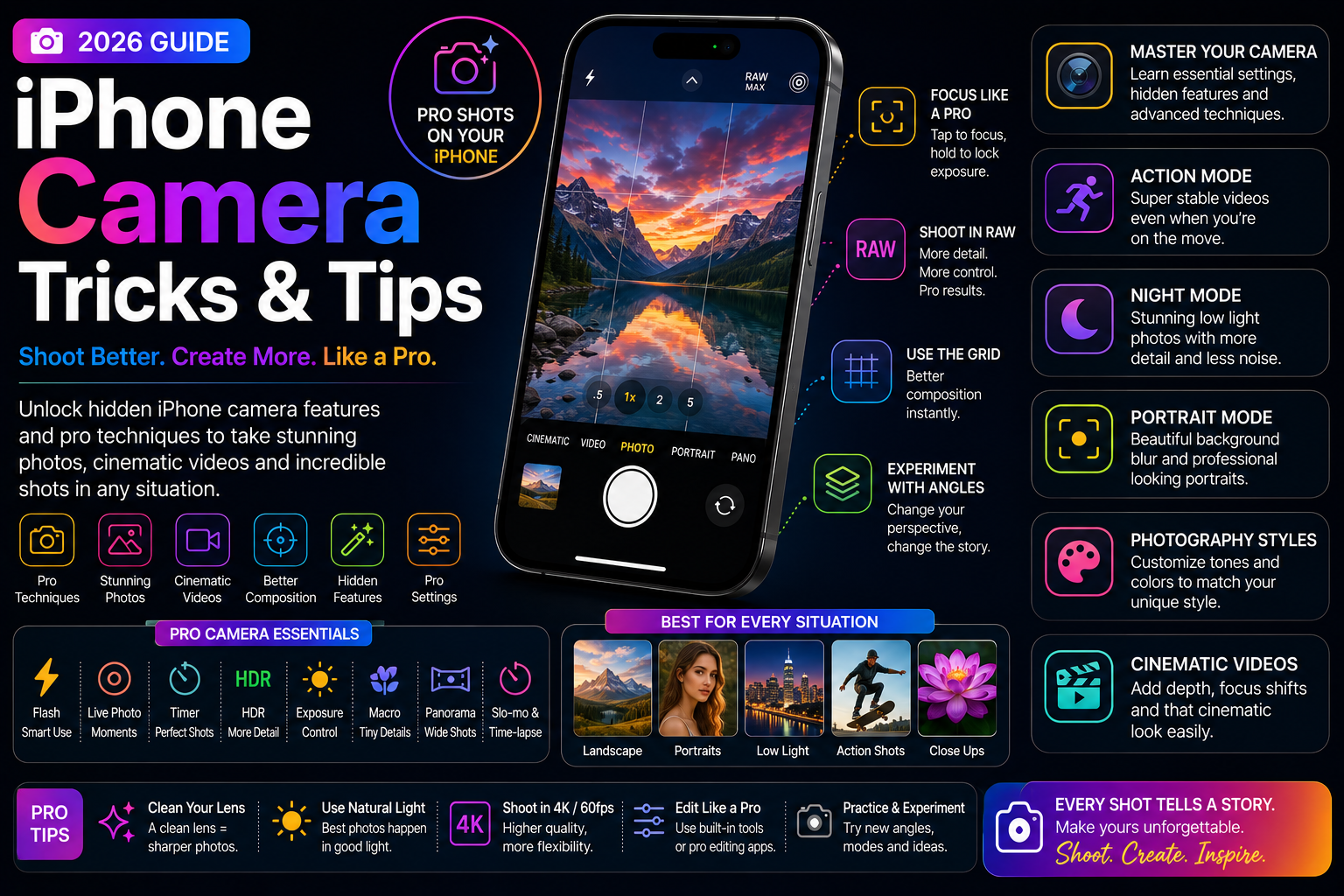
This long-form evergreen smartphone guide focuses on practical real-world usage patterns, creator workflows, AI tools, battery optimization, storage cleanup, privacy protection and performance improvements.
Why iPhone Camera Tricks Matter
Modern iPhones include powerful camera systems capable of producing professional-quality photos and videos.
However, many users only use basic camera functions while missing hidden tools and advanced creator-focused features.
Learning hidden iPhone camera tricks can dramatically improve photography, cinematic videos, social media content and everyday smartphone creativity.
Use QuickTake for Instant Video Recording
QuickTake allows users to start recording video instantly while in photo mode without switching camera modes.
This feature is especially useful for capturing unexpected moments quickly.
- Faster video capture
- Useful for travel and events
- Great for social media creators
- Improves spontaneous recording
- Reduces missed moments
Copy and Paste Photo Edits
The Photos app allows users to copy edits from one image and apply them to multiple photos instantly.
This dramatically speeds up editing workflows for creators and social media users.
- Maintain consistent photo styles
- Batch editing workflows
- Save editing time
- Improve Instagram content creation
- Faster creator productivity
Master Exposure and Focus Control
Tapping and holding on the screen locks focus and exposure for more stable photography.
Users can also manually adjust brightness before capturing photos.
- Improve low-light photography
- Prevent unwanted focus changes
- Control image brightness
- Improve portrait shots
- Better cinematic framing
Use Cinematic Mode Properly
Cinematic Mode creates depth effects and automatic focus transitions that make videos look more professional.
This feature is especially useful for creators recording interviews, lifestyle content and social media videos.
- Background blur effects
- Automatic focus shifting
- Professional-looking video
- Improved storytelling
- Useful for Reels and Shorts
Hidden Live Photos Features
Live Photos capture moments before and after taking a picture, allowing users to create effects and choose better frames.
Users can also create long exposure and looping effects.
- Loop effects
- Bounce animations
- Long exposure photography
- Choose better frames
- Creative social media content
Apple Intelligence and AI Photography
Apple Intelligence improves photo organization, editing workflows and contextual image understanding.
AI tools help users clean up images, search photos and improve productivity.
- AI photo cleanup
- Natural language photo search
- Smart image enhancement
- Improved creator workflows
- Faster media organization
Improve Night Mode Photography
Night Mode can dramatically improve low-light photography when used correctly.
Keeping the phone stable and adjusting exposure timing helps produce cleaner images.
- Use stable hand positioning
- Improve low-light detail
- Reduce image noise
- Capture better city and travel shots
- Enhance nighttime content
Optimize Video Recording Settings
Video quality depends heavily on frame rate, stabilization and lighting conditions.
Choosing the right recording settings improves creator workflows significantly.
- 4K recording optimization
- 24fps cinematic workflows
- 60fps action video recording
- Action Mode stabilization
- Social media video optimization
Useful Hidden Camera Shortcuts
Several hidden shortcuts make the iPhone camera much faster and easier to use.
These small workflow improvements save time during photography sessions.
- Open camera from lock screen
- Use volume buttons as shutter controls
- Quick camera launch shortcuts
- Burst mode capture
- Fast creator workflows
Camera Tricks for Content Creators
Creators can combine iPhone camera features with editing apps and accessories to produce professional-looking content.
Workflow optimization is essential for fast content production.
- Social media recording setups
- Creator lighting improvements
- Portable microphone integration
- Tripod stabilization workflows
- Fast mobile editing routines
Manage Photos and Video Storage
High-quality photos and videos consume large amounts of storage space.
Efficient media management improves device performance and creator workflows.
- Use iCloud optimization
- Delete duplicate media
- Transfer large video files
- Organize creator assets
- Reduce unnecessary storage usage
Battery and Thermal Tips for Camera Usage
Heavy camera usage can quickly drain battery and generate heat.
Optimizing recording conditions helps maintain performance.
- Reduce overheating during long recording
- Use battery-efficient settings
- Avoid direct sunlight during filming
- Optimize creator workflows
- Use certified charging accessories
Privacy and Camera Permissions
Users should carefully manage camera and photo permissions for apps.
Privacy-focused settings help protect personal media and sensitive information.
- Review app camera permissions
- Limit unnecessary photo access
- Protect creator content
- Use secure cloud backups
- Improve media privacy
Unlock the Full Power of the iPhone Camera
Modern iPhones offer far more camera capabilities than most users realize.
By learning hidden tricks, creator workflows and AI-powered tools, users can dramatically improve photography and video quality.
Small camera improvements often make the biggest difference in content creation and everyday smartphone creativity.
Frequently Asked Questions
What are the best hidden iPhone camera tricks?
Useful hidden camera tricks include QuickTake video, copy and paste edits, exposure lock, Cinematic Mode, Live Photos effects and Action Mode stabilization.
How do I lock focus and exposure on iPhone?
Tap and hold on the screen until AE/AF Lock appears, then adjust brightness manually if needed.
What is QuickTake on iPhone?
QuickTake allows users to record videos instantly from photo mode by holding the shutter button.
Does Apple Intelligence improve photography?
Yes. Apple Intelligence improves photo organization, editing workflows, image understanding and AI-powered enhancements.
Which iPhone camera features help creators most?
Cinematic Mode, Action Mode, ProRes recording, copy and paste edits and advanced stabilization are especially useful for creators.
Related Reading on Godealio
- Best iPhone Video Recording Settings
- Best iPhone Features for Content Creators
- Apple Intelligence Features Explained
- Android Camera Tricks
- iPhone 16 vs iPhone 17: Camera, Battery, Performance and Upgrade Guide
- Apple iPhone 17 vs iPhone 16: display, camera, battery, AI, performance & best iPhone to buy
- iPhone 17 Pro Max Review: Apple's Most Complete iPhone Ever
- Apple iPhone 17 Pro vs iPhone 16 Pro: camera, performance, battery, AI & flagship comparison
- ChatGPT Tricks Most People Still Aren’t Using
- Vivo X300 Pro Review: The Camera Flagship Most People Should Buy
More Guide Details
Author
Godealio Editorial Team
Featured
false