
Google Gemini for macOS Gets a New Look and Faster Screenshot Workflow
Google is rolling out a refreshed Gemini experience for macOS with a redesigned icon, improved desktop integration and a new screenshot shortcut that makes visual AI assistance much faster.
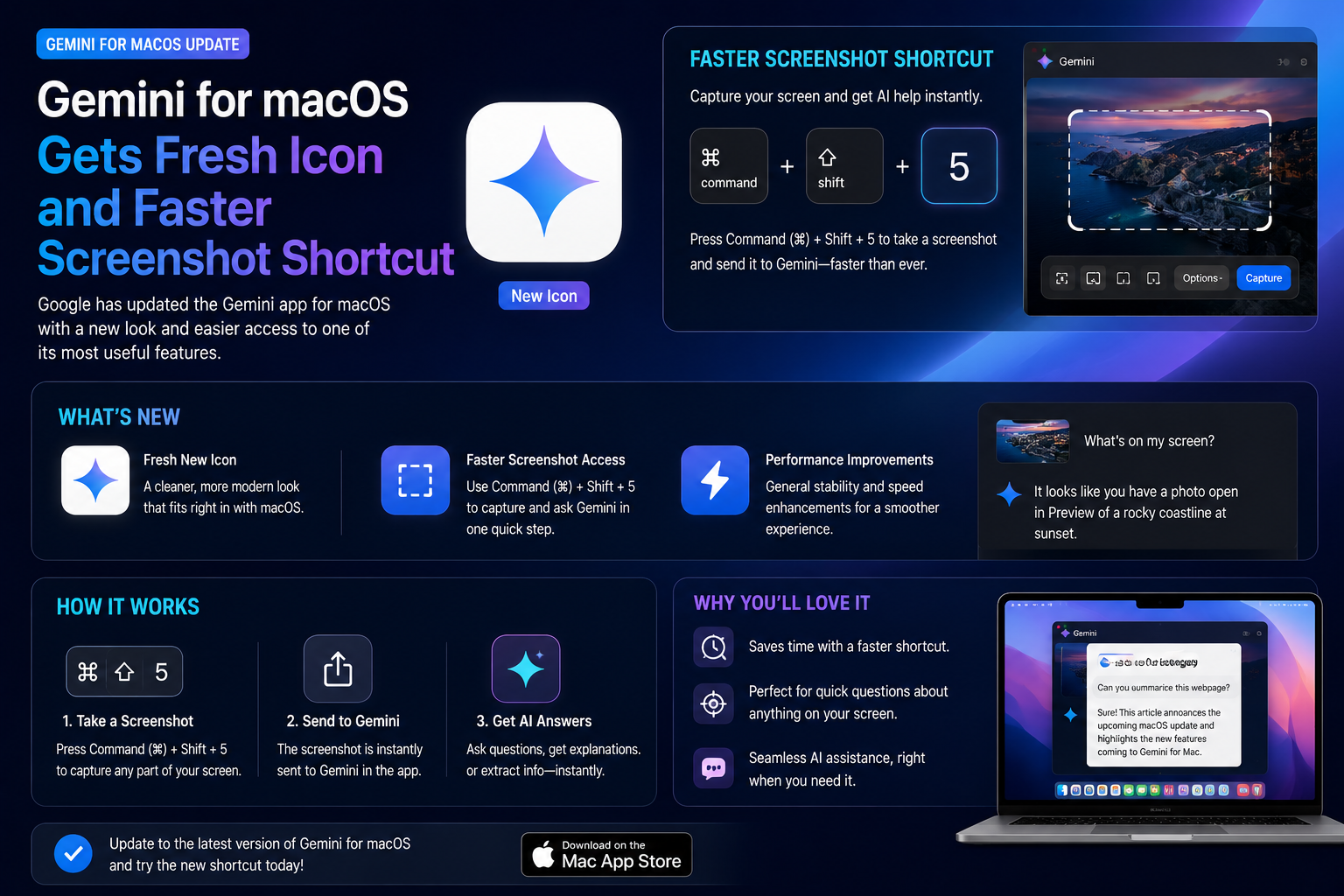
Google has released an update for the Gemini app on macOS that introduces a refreshed app icon and a powerful new screenshot shortcut designed to improve productivity. The update allows users to quickly capture part of their screen and send it directly to Gemini for analysis, troubleshooting, explanations or content generation. By reducing the number of steps required to interact with AI, Google is positioning Gemini as a more capable desktop assistant that can understand text, images, code snippets, error messages and visual content in real time. The update reflects Google's growing focus on AI-powered desktop workflows and strengthens Gemini's role as a practical everyday productivity tool for Mac users.
Brand
Model
Gemini for macOS
Topic
Desktop AI Apps
Content Type
news
Launch Status
Rolling Out
Availability
Global
Rating
9
Pros
- New modern Gemini icon
- Faster screenshot-based AI interactions
- Improved desktop productivity
- Better visual question workflows
- Useful for developers and students
- Simplifies troubleshooting tasks
- Improves AI accessibility on macOS
- Strengthens Gemini desktop experience
Cons
- Rollout may be gradual
- Feature availability may vary by region
- Requires latest Gemini app version
- Some advanced features depend on account access
Final Verdict
This may appear to be a small update, but the new screenshot shortcut significantly improves how users interact with Gemini on macOS. Faster access to visual AI assistance can save time for developers, students, creators and professionals who regularly work with screenshots, documents and on-screen content.
Gemini Gets a More Refined macOS Experience
Google continues improving Gemini's desktop presence with a new macOS update focused on usability and workflow efficiency.
The latest release introduces a refreshed application icon alongside a new screenshot shortcut designed to streamline interactions with AI.
The update makes Gemini feel more integrated into everyday Mac workflows.
Refreshed Gemini Icon Arrives on macOS
One of the first visible changes is a redesigned Gemini application icon.
The updated branding aligns more closely with Google's evolving Gemini identity across mobile, web and desktop platforms.
Although cosmetic, the refreshed icon helps create a more consistent experience across devices.
- Updated visual design
- Consistent Gemini branding
- Modernized appearance
- Improved desktop recognition
Screenshot Shortcut Is the Biggest Upgrade
The new screenshot shortcut allows users to capture part of their screen and immediately send it to Gemini.
Instead of manually saving screenshots and uploading files, users can now interact with AI much faster.
This significantly reduces friction when asking questions about visual content.
- Capture screen instantly
- Send screenshots directly to Gemini
- Faster visual AI interactions
- Reduced workflow steps
- Better productivity experience
- Ideal for quick questions
Practical Ways Users Can Use the Feature
The screenshot shortcut opens up many real-world productivity scenarios.
Users can quickly ask Gemini to explain what appears on their screen, summarize content or help solve technical problems.
- Explain error messages
- Analyze code snippets
- Summarize documents
- Translate screenshots
- Identify interface elements
- Generate content from visual information
Developers May Benefit the Most
Developers frequently work with screenshots containing logs, terminal output, code errors and UI designs.
The new workflow allows them to quickly capture these elements and ask Gemini for explanations or troubleshooting guidance.
This can accelerate debugging and learning processes.
Google Continues Expanding Desktop AI Features
The desktop AI market has become increasingly competitive as companies race to integrate AI directly into operating systems and productivity tools.
Google's screenshot shortcut represents another step toward making Gemini a constant desktop companion rather than simply a chatbot.
- Visual AI assistance
- Desktop productivity tools
- Workflow automation
- Context-aware interactions
- Multimodal AI experiences
Students and Creators Can Save Time
Students can quickly capture study materials and request explanations.
Creators can analyze layouts, screenshots and visual references without leaving their workflow.
The feature reduces the effort required to interact with AI during everyday tasks.
A Glimpse Into Google's Desktop AI Vision
The screenshot shortcut hints at a future where Gemini becomes deeply integrated into desktop workflows.
Rather than requiring users to open a separate browser tab, AI assistance becomes available wherever users are working.
This aligns with broader industry trends toward always-accessible AI tools.
Small Update, Meaningful Productivity Gains
While the new icon refreshes Gemini's appearance, the screenshot shortcut delivers the real value.
The ability to instantly capture visual content and send it to AI makes Gemini more practical, more accessible and more useful for everyday Mac users.
FAQs
What is new in the latest Gemini for macOS update?
The update introduces a redesigned app icon and a new screenshot shortcut that allows users to quickly send screen captures to Gemini.
Why is the screenshot shortcut useful?
It allows users to instantly share visual content with Gemini without manually saving and uploading screenshots.
Who benefits most from the new feature?
Developers, students, creators and professionals who frequently work with visual content and screenshots.
Can Gemini analyze screenshots?
Yes. Gemini can interpret screenshots, explain content, summarize information and help answer questions about what appears on screen.
Is the update available globally?
Google is rolling out the update gradually, so availability may vary by region and account.
Does the update improve Gemini's AI capabilities?
The update primarily focuses on usability and workflow improvements, making existing AI features easier and faster to access.