
Android 17 QPR1 Beta 3 Reveals New Screenshot Buttons, Likely Built for Aluminium OS
Google’s latest Android 17 QPR1 beta hides new screenshot shortcuts that appear designed for laptops, tablets, foldables and future desktop-style Android devices.
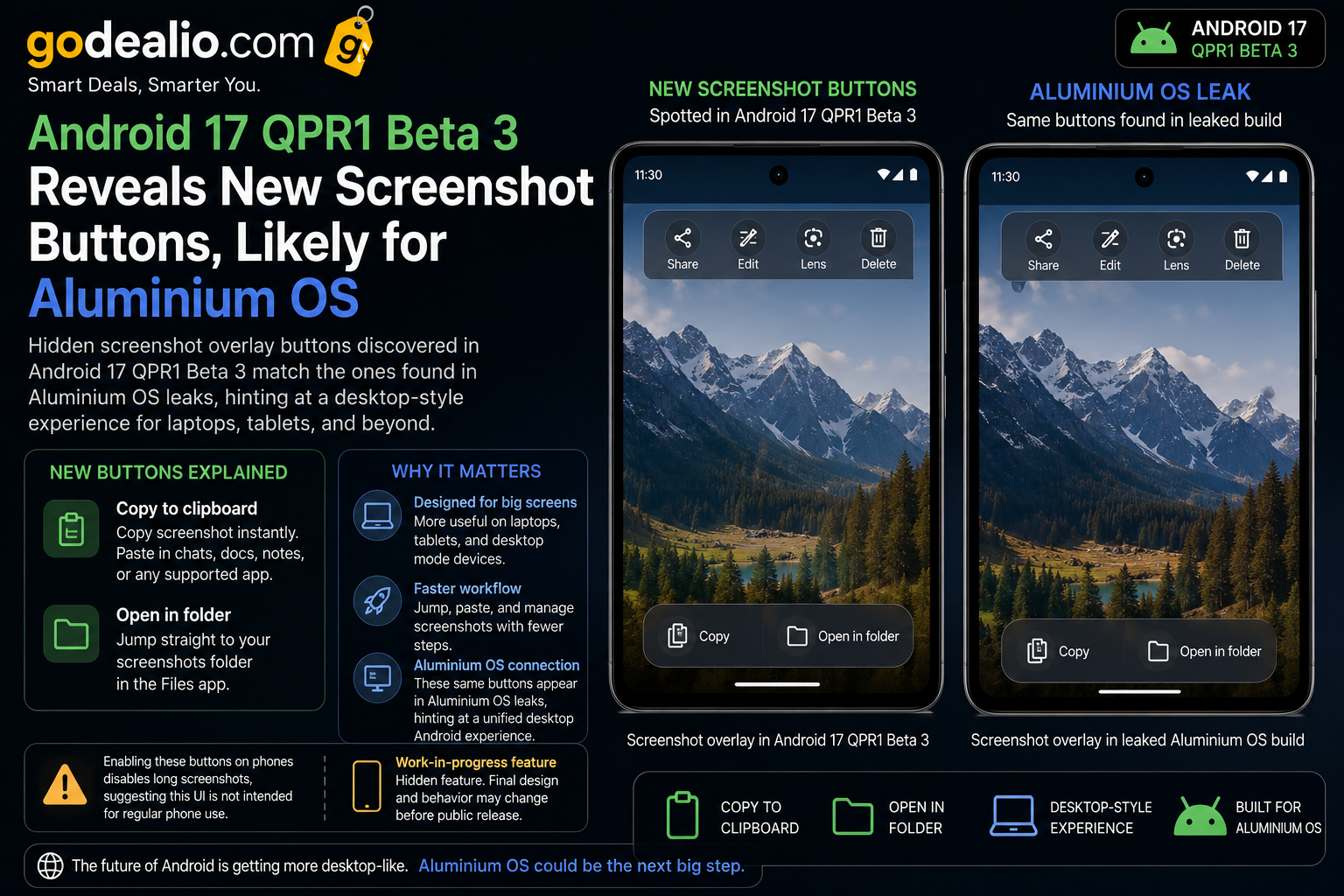
Android 17 QPR1 Beta 3 introduces hidden screenshot overlay actions including clipboard copy and direct folder access. The feature appears closely linked to Google’s rumoured Aluminium OS project, hinting at a more desktop-style Android experience focused on tablets, hybrid devices and productivity workflows.
Brand
Model
Android 17 QPR1 Beta 3
Launch Status
Hidden beta feature
Availability
Android 17 QPR1 Beta builds
Rating
8.6
Specification Highlights
Label
Platform
Value
Android 17 QPR1 Beta 3
Label
Feature
Value
New screenshot overlay actions
Label
Shortcut 1
Value
Copy screenshot to clipboard
Label
Shortcut 2
Value
Open screenshot folder
Label
Likely Device Target
Value
Tablets, foldables and Aluminium OS devices
Label
Current Status
Value
Hidden experimental beta feature
Pros
- Adds faster screenshot clipboard workflow
- Improves file management accessibility
- Makes Android feel more desktop-oriented
- Useful for tablets and productivity devices
- Hints at Google's future Aluminium OS direction
- Could improve Android laptop workflows
Cons
- Feature is hidden and unfinished
- Not officially announced by Google
- Long screenshot support may disappear when enabled
- May never ship on standard Android phones
- Still limited in current beta builds
Android 17 QPR1 Beta 3 Hints at a Bigger Productivity Push
Google’s latest Android 17 QPR1 Beta 3 update contains hidden screenshot overlay buttons that could reveal the company’s future desktop-style Android ambitions.
The new controls allow users to instantly copy screenshots to clipboard or open the screenshot location directly inside the Files app.
While the feature appears small at first glance, it feels much more useful on laptops, tablets and large-screen Android devices than on traditional smartphones.
What Are the New Screenshot Buttons?
The updated screenshot overlay introduces two additional actions.
One button copies screenshots directly into clipboard memory for instant pasting into supported apps.
The second button immediately opens the screenshot folder inside Android Files, reducing the number of steps required to manage captured content.
- Instant screenshot copy workflow
- Faster screenshot management
- Desktop-like screenshot behavior
- Improved multitasking potential
Why This Feels More Like a Laptop Feature
Copying screenshots directly into clipboard memory is especially useful on larger displays where multitasking and drag-and-drop workflows are common.
The feature behaves similarly to Windows and ChromeOS screenshot systems, which makes Android feel more desktop-oriented.
That strongly suggests Google is designing this experience for future productivity-focused Android hardware.
Connection to Aluminium OS
Reports indicate these same screenshot buttons were also spotted inside leaked Aluminium OS builds.
Aluminium OS is widely expected to become Google’s next-generation desktop-style Android experience for tablets, laptops and hybrid computing devices.
The screenshot workflow fits perfectly with a desktop-oriented operating system where clipboard actions and direct file access are far more important.
- Matches leaked Aluminium OS interface behavior
- Better suited for keyboard-and-mouse workflows
- Improves productivity-oriented multitasking
- Supports desktop-style Android direction
Why Copy-to-Clipboard Is Important
Clipboard screenshot workflows are extremely useful in productivity environments.
Users can instantly paste screenshots into emails, chat apps, presentations, note-taking apps and editing tools without saving and reopening image files manually.
This becomes especially useful on foldables, tablets and Android laptops.
Direct Folder Access Makes Android More Practical
The second shortcut opens the screenshot location immediately inside Files.
This reduces friction for users who frequently move, rename or upload screenshots.
Desktop operating systems already prioritize fast file management, and Android appears to be moving in the same direction.
Android’s Future on Tablets and Foldables
Google has been steadily improving Android for larger screens through better multitasking, desktop windowing and tablet optimization.
This screenshot feature fits that larger strategy.
Android tablets and foldables increasingly compete with laptops for productivity usage, and features like this help close workflow gaps.
Will Phone Users Get This Feature?
At the moment, the feature appears unfinished on standard phones.
Reports suggest enabling the new buttons can remove the long screenshot option, which indicates the UI is still experimental.
Google may eventually limit the feature to larger-screen devices or redesign it before public release.
Android Is Becoming More Like ChromeOS
Over the last few Android versions, Google has added better desktop windowing, keyboard shortcuts, taskbar improvements and larger-screen optimizations.
The screenshot overlay changes continue that transition toward desktop-style computing.
Instead of replacing ChromeOS entirely, Aluminium OS may eventually merge Android and desktop workflows more closely.
Why This Small Feature Matters
Minor interface updates often reveal larger platform strategies.
The new screenshot workflow suggests Google is actively thinking about Android productivity beyond smartphones.
If Aluminium OS becomes real consumer hardware, these kinds of desktop-style interactions will become increasingly important.
Final Thoughts
Android 17 QPR1 Beta 3’s hidden screenshot buttons may look like a small experimental change today.
But they offer one of the clearest hints yet that Google is preparing Android for more serious desktop-style productivity devices.
For Android tablets, foldables and future Aluminium OS hardware, this could become part of a much larger transformation.
FAQs
What new screenshot buttons were found in Android 17 QPR1 Beta 3?
The beta includes hidden buttons for copying screenshots to clipboard and opening the screenshot folder directly in Files.
What is Aluminium OS?
Aluminium OS is believed to be Google's future desktop-style Android platform designed for tablets, laptops and productivity devices.
Are these features available on all Android phones?
Not currently. The feature appears experimental and may be intended primarily for larger-screen devices.
Why is copy-to-clipboard useful?
It allows users to instantly paste screenshots into chat apps, notes, emails and productivity software without manually opening files.
Does enabling the feature affect long screenshots?
Reports suggest enabling the hidden buttons can disable long screenshot functionality on some phones.
Why is this important for Android tablets and laptops?
The workflow feels more desktop-oriented and supports productivity-focused multitasking on larger displays.