
Apple TV 4K Multiview Guide: How to Watch Up to Four Live Sports Streams at Once
Apple TV 4K's Multiview feature lets sports fans follow multiple games, races and live events simultaneously from a single screen without constantly switching between streams.
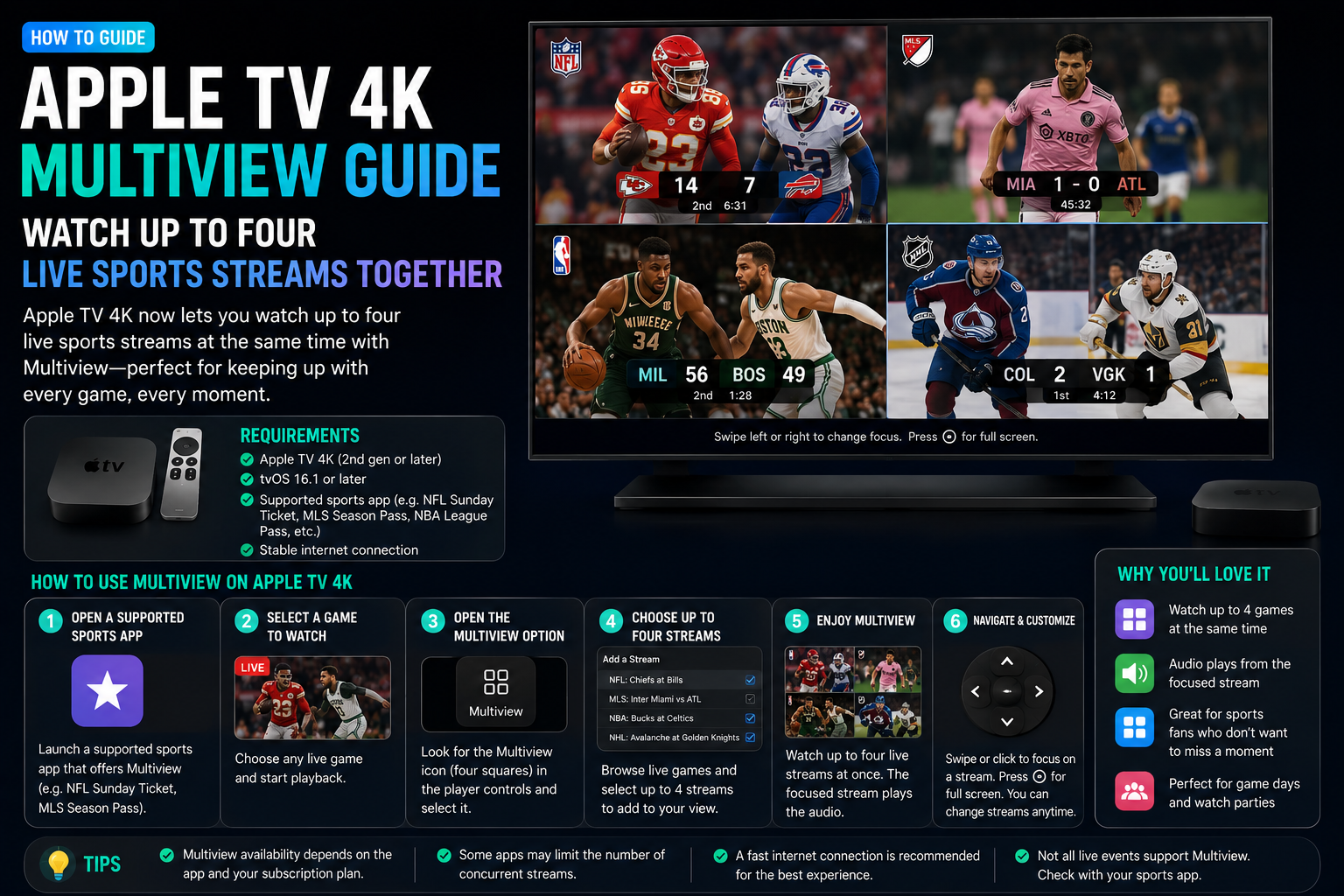
Apple TV 4K includes one of the most useful features available for sports fans: Multiview. The feature allows users to watch up to four live sports streams simultaneously on a single television, making it easier to follow multiple games, tournaments and events at the same time. Whether you're tracking football matches, Formula 1 races, cricket tournaments, tennis competitions or multiple leagues on a busy weekend, Multiview reduces the need to constantly switch between apps and channels. Combined with Apple TV's smooth interface, powerful hardware and supported streaming services, the feature delivers one of the best sports-viewing experiences currently available on a streaming platform.
Brand
Apple
Model
Apple TV 4K Multiview
Topic
Sports Streaming
Content Type
guide
Launch Status
Available
Availability
Supported Apple TV 4K Devices
Rating
9.3
Pros
- Watch up to four live sports streams simultaneously
- Excellent for major sports weekends
- Reduces channel switching
- Clean Apple TV interface
- Smooth navigation between feeds
- Works well for football, cricket and motorsports
- Maximizes large-screen viewing
- One of the best sports-viewing features available
Cons
- Limited to supported streaming services
- Requires Apple TV 4K hardware
- Fast internet connection recommended
- Not available for every live event
Final Verdict
Apple TV 4K Multiview is one of the most valuable features available for sports enthusiasts. The ability to follow multiple live events simultaneously creates a premium viewing experience that is difficult to match on competing streaming platforms.
What Is Apple TV 4K Multiview?
Multiview is a feature that allows Apple TV 4K users to watch multiple live sports streams simultaneously on a single screen.
Instead of switching between games, viewers can monitor several events at once while maintaining full visibility of the action.
The feature is particularly useful during busy sports weekends when multiple competitions overlap.
How Multiview Works
Supported streaming services allow users to add multiple live feeds into a single viewing layout.
Apple TV dynamically arranges the streams and allows users to switch audio focus between games.
Users can highlight individual streams, expand a selected game or quickly navigate between active events.
- View up to four live streams
- Switch audio between games
- Expand individual feeds
- Monitor multiple leagues
- Navigate quickly using Siri Remote
- Optimized for large-screen TVs
Best Sports for Multiview
The feature shines when several events are taking place simultaneously.
Sports fans can monitor multiple matches without missing key moments.
- Football leagues
- Champions League matches
- Cricket tournaments
- Formula 1 races
- MotoGP events
- Tennis tournaments
- Basketball games
- Baseball games
How to Use Multiview on Apple TV 4K
The exact steps vary depending on the streaming provider, but the process is generally straightforward.
Users can add additional streams from supported live sports broadcasts and customize the viewing layout.
- Open a supported sports streaming app
- Start watching a live event
- Select the Multiview option
- Add additional live streams
- Choose preferred layout
- Switch audio between events
Internet Speed Requirements
Because multiple streams are displayed simultaneously, a stable internet connection is important.
Higher-quality streams require additional bandwidth, especially when viewing four events at once.
A fast home Wi-Fi network helps ensure smooth playback.
- High-speed broadband recommended
- Wi-Fi 6 preferred
- 4K streams require more bandwidth
- Ethernet provides best stability
Supported Apps and Services
Multiview availability depends on support from individual streaming services.
Apple continues working with sports partners to expand compatibility.
Not every app or live event currently supports Multiview functionality.
Why Sports Fans Love Multiview
Sports fans often struggle when several important games occur at the same time.
Multiview solves that problem by allowing viewers to follow multiple competitions without changing channels.
The feature is especially useful during playoffs, international tournaments and championship weekends.
- Never miss important moments
- Track multiple teams
- Follow multiple leagues
- Perfect for fantasy sports players
- Ideal for sports analysts
- Improves game-day experience
Why Apple TV 4K Stands Out
Apple TV 4K continues to differentiate itself through performance, interface quality and premium streaming features.
Multiview adds significant value for sports-focused households and helps justify the platform's premium positioning.
Combined with Siri integration and strong app support, it creates one of the best living-room sports experiences available.
One of the Best Features for Sports Fans
Apple TV 4K Multiview transforms how live sports are consumed at home.
For users who regularly follow multiple teams, tournaments or sporting events, the feature can significantly improve the viewing experience and reduce the frustration of constantly switching between streams.
FAQs
How many streams can Apple TV 4K Multiview display?
Apple TV 4K can display up to four supported live sports streams simultaneously.
Do all streaming apps support Multiview?
No. Multiview support depends on individual streaming providers and available live events.
Can I switch audio between streams?
Yes. Apple TV allows users to focus audio on a selected stream while continuing to view others.
Does Multiview require Apple TV 4K?
Yes. The feature is designed for supported Apple TV 4K hardware.
What internet speed is recommended?
A fast and stable broadband connection is recommended, especially when viewing multiple HD or 4K streams.
Is Multiview useful outside sports?
Currently the feature is primarily focused on supported live sports events.