
Android Battery Calibration Guide (2026): Does It Really Work?
Learn when Android battery calibration is useful, when it is unnecessary, and how to safely fix inaccurate battery percentage readings without damaging your battery.
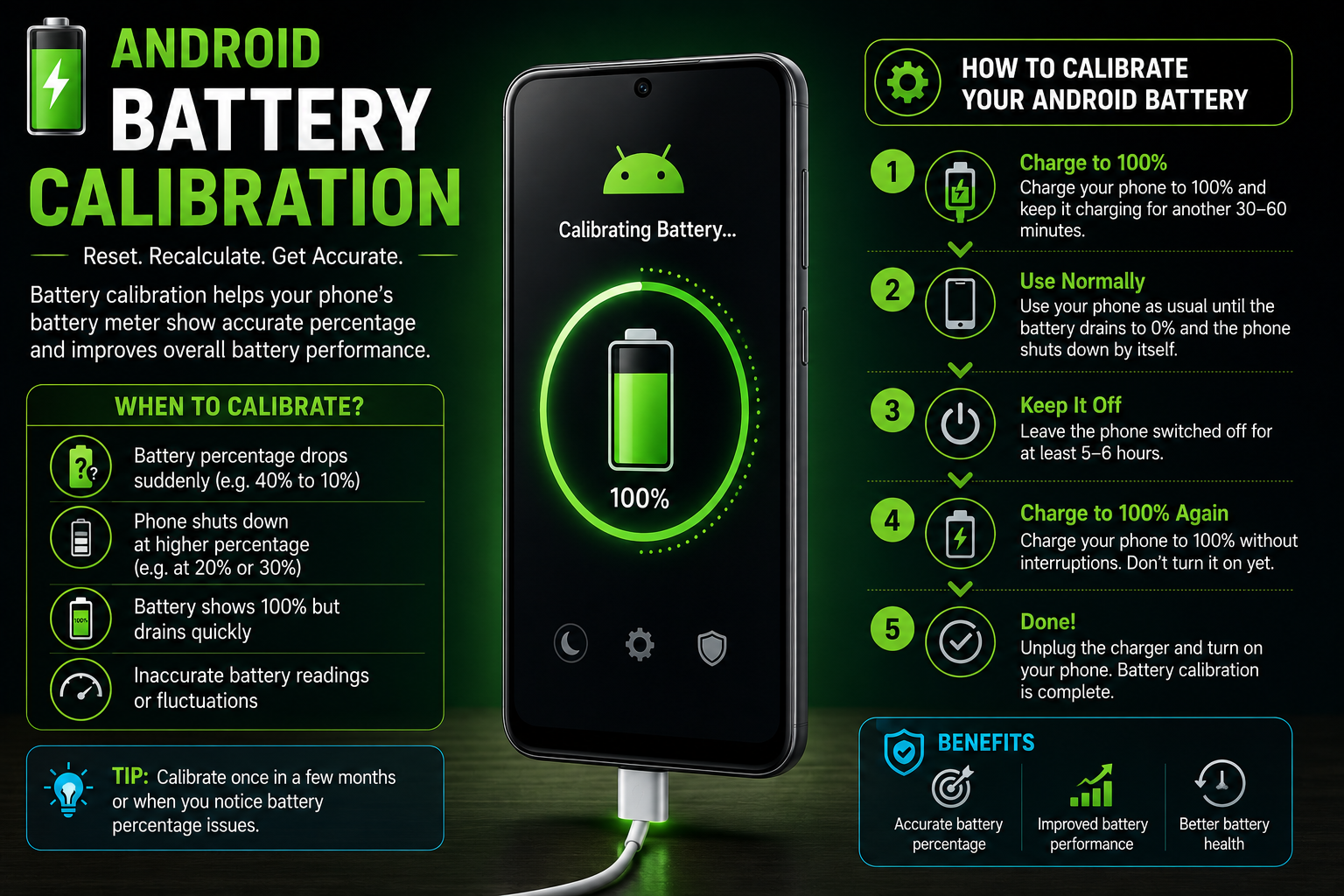
Battery calibration is one of the most misunderstood Android maintenance topics. Many users believe calibration can restore battery health, increase battery capacity or fix rapid battery drain. In reality, calibration only helps Android estimate the remaining battery percentage more accurately when the displayed percentage becomes unreliable. This complete guide explains how battery percentage estimation works, when calibration may help, when it should be avoided, how to perform one safe calibration cycle and how to protect long-term battery health.
Quick Verdict
Guide Overview
- Guide type
- Evergreen Troubleshooting Guide
Editorial Methodology
What Is Android Battery Calibration?
Battery calibration helps Android estimate the remaining charge more accurately. It does not repair the battery, increase capacity or improve battery health.
Battery calibration is the process of helping Android rebuild a more accurate estimate of the battery's usable charge range. The percentage displayed in the status bar is not a direct measurement of energy remaining inside the battery. It is an estimate calculated by Android and the phone's Battery Management System.
Modern Android smartphones use lithium-ion or lithium-polymer batteries. These batteries do not suffer from the traditional memory effect associated with older nickel-based rechargeable batteries. As a result, they do not require regular full discharge and recharge cycles.
During normal use, Android monitors battery voltage, current flow, temperature, charging speed, discharge behaviour and previous usage patterns. It combines this information to estimate the remaining battery percentage.
Occasionally, the software estimate may become inaccurate. A phone may shut down while showing 15%, remain at 100% for an unusually long time or suddenly fall from 40% to 20%. In these situations, one controlled calibration cycle may help.
Calibration changes only the accuracy of the percentage reading. It cannot restore damaged battery cells, reverse chemical ageing, improve maximum capacity or make an old battery behave like a new one.
Most modern Android devices automatically refine their battery estimates during ordinary charging and usage. Manual calibration should therefore be treated as a troubleshooting step rather than routine maintenance.
How Android Calculates Battery Percentage
Android estimates battery percentage using voltage, current, temperature, charge history and battery management data.
A smartphone battery cannot directly report an exact percentage in the same way a fuel tank can be visually measured. The remaining charge must be estimated using information collected by hardware sensors and software algorithms.
The Battery Management System measures battery voltage and monitors how much electrical current enters or leaves the battery. This process is often called coulomb counting.
Android also considers battery temperature because voltage and available capacity change under hot or cold conditions. A phone used in extreme temperatures may temporarily display less stable battery readings.
The operating system compares current measurements with historical charging and discharging behaviour. Over time, this helps Android understand how the battery performs under different workloads.
Battery ageing also changes the relationship between voltage and remaining capacity. A battery that originally stored 5,000mAh may store considerably less after years of use, even though Android still displays a range from 0% to 100%.
When software estimates and the battery's real usable range become misaligned, the displayed percentage may behave abnormally. Calibration allows Android to observe one complete usable range and update its estimate.
Battery Calibration vs Battery Health
Battery calibration and battery health describe two completely different aspects of smartphone battery performance.
Battery calibration refers to the accuracy of the percentage displayed by Android. Battery health refers to the physical condition of the battery cells and how much energy they can still store compared with when they were new.
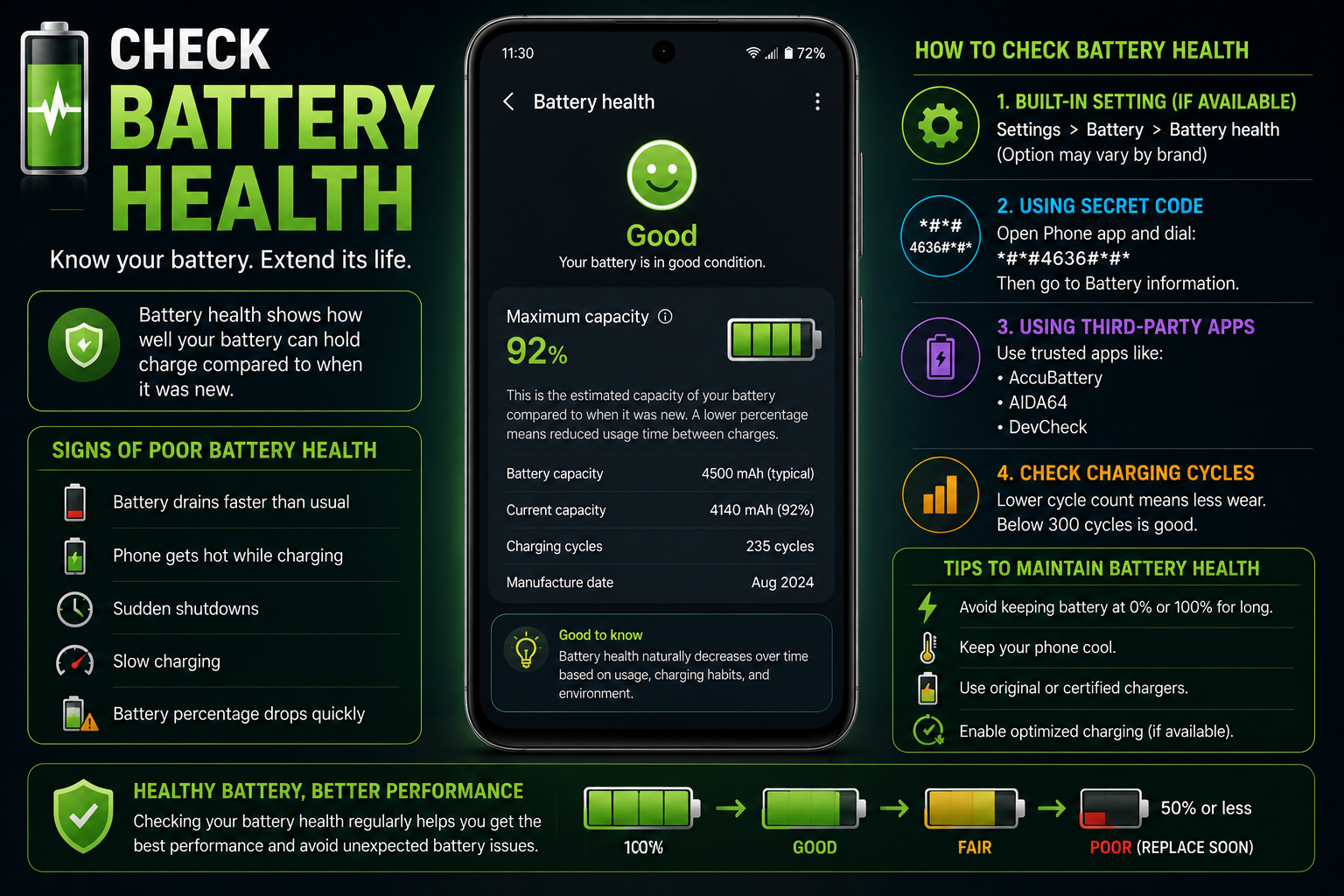
For example, a battery with 80% health can store only around 80% of its original usable capacity. Android may still accurately show that reduced capacity as a range from 0% to 100%.
Calibration cannot restore the missing capacity. It can only help Android display the remaining charge more consistently.
A phone may have excellent battery health but inaccurate percentage readings after a software issue. It may also have poor battery health while reporting the percentage accurately.
If battery runtime has gradually become shorter over several years, physical degradation is more likely than a calibration error.
If the battery percentage changes suddenly, the phone shuts down early or the reading changes significantly after restarting, the estimation system may be inaccurate.
Signs Your Android Battery May Need Calibration
Calibration should only be considered when the battery percentage behaves abnormally and the battery is otherwise safe to use.
Most Android users will never need to perform manual battery calibration. Modern battery management systems continuously improve their estimates during daily use.
Calibration becomes relevant only when the displayed percentage is clearly inconsistent with the phone's actual behaviour.
One unusual percentage change does not automatically justify calibration. Restart the phone, install pending software updates and observe the behaviour across several charging cycles first.
A calibration cycle may be useful after a battery replacement because the operating system may still be adapting to the characteristics of the new battery.
Major Android updates, long periods without use, interrupted charging patterns or unexpected shutdowns can occasionally cause battery estimates to become temporarily inaccurate.
If the same symptoms continue after calibration, the battery may be degraded or another hardware problem may be present.
When Battery Calibration Will Not Help
Calibration cannot solve physical battery damage, rapid app-related drain, overheating or charging hardware faults.
Battery calibration is not a universal fix for every battery-related problem. It only addresses inaccurate percentage estimation.
If your phone loses charge rapidly because of gaming, high display brightness, weak mobile signal, GPS, background synchronization or demanding applications, calibration will not reduce the power being consumed.
An ageing battery with reduced capacity cannot be repaired through software. Even perfectly calibrated percentage readings will not make the battery last longer.
Charging problems caused by a damaged cable, defective charger, blocked charging port or failing charging controller require hardware troubleshooting.
Overheating can be caused by processor load, environmental temperature, charging conditions, battery damage or internal hardware problems. Calibration is not a temperature-control feature.
Never attempt calibration when the battery is swollen, leaking, producing an unusual smell or becoming dangerously hot.
Common Battery Calibration Myths
Many battery calibration tips found online are outdated and originate from the era of nickel-based rechargeable batteries rather than modern lithium-ion batteries.
Battery calibration has become one of the biggest Android myths on the internet. Countless articles and videos claim that draining the battery to 0% every month increases battery life, restores battery health or improves charging speed. None of these claims are true for modern lithium-ion batteries.
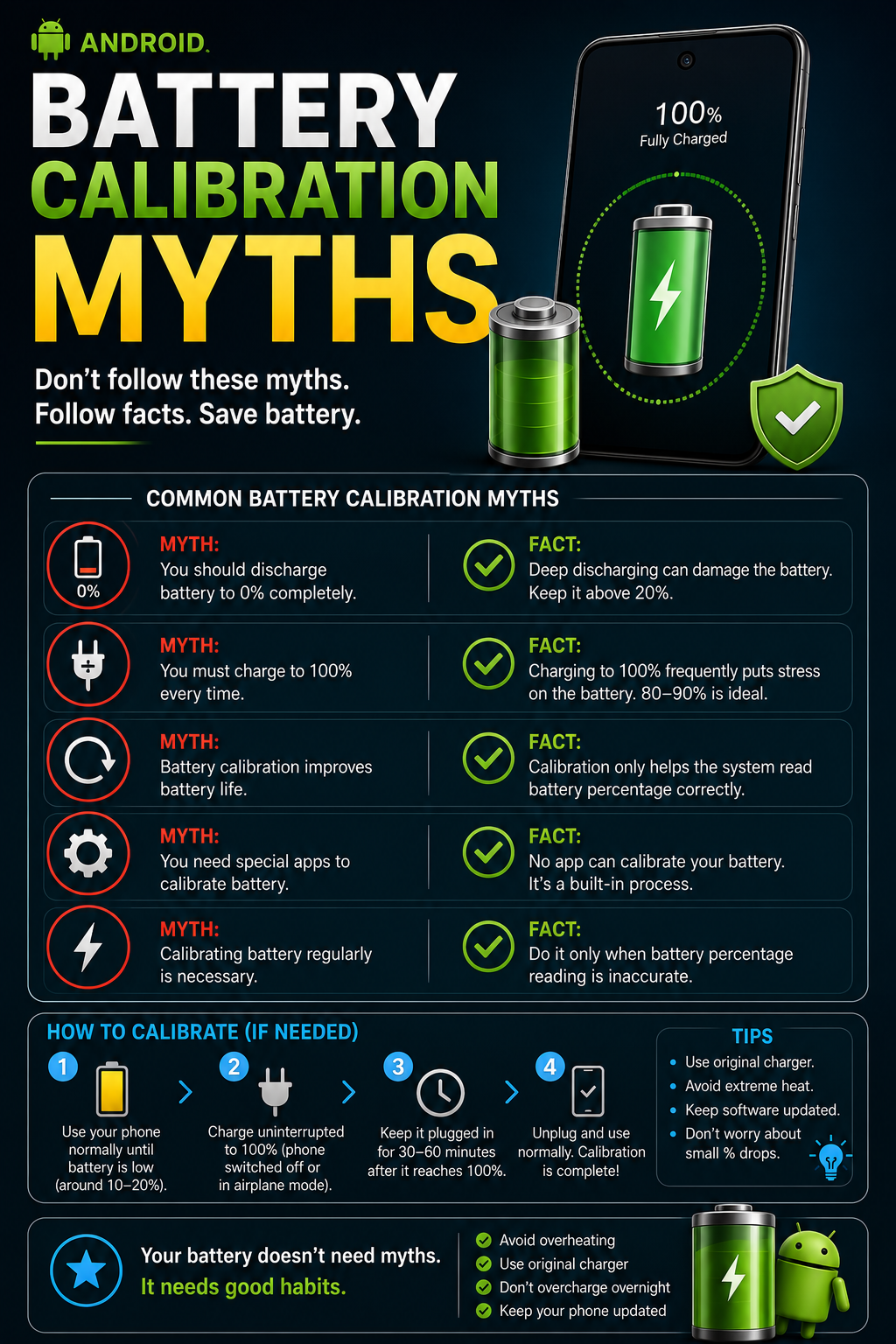
Older nickel-cadmium batteries suffered from the memory effect and occasionally benefited from complete discharge cycles. Modern lithium-ion batteries do not have this behaviour and actually experience additional stress when repeatedly discharged completely.
Today's Android smartphones continuously monitor battery behaviour through sophisticated Battery Management Systems. Every charging session, discharge cycle, voltage reading and temperature change helps Android improve battery estimation automatically.
Following outdated battery advice can reduce battery lifespan instead of improving it. Healthy charging habits are far more beneficial than repeated calibration cycles.
How to Safely Calibrate Your Android Battery
Only perform calibration when battery percentage readings are clearly inaccurate.
Battery calibration should never become part of regular phone maintenance. It is intended only for situations where Android clearly miscalculates the remaining battery percentage.
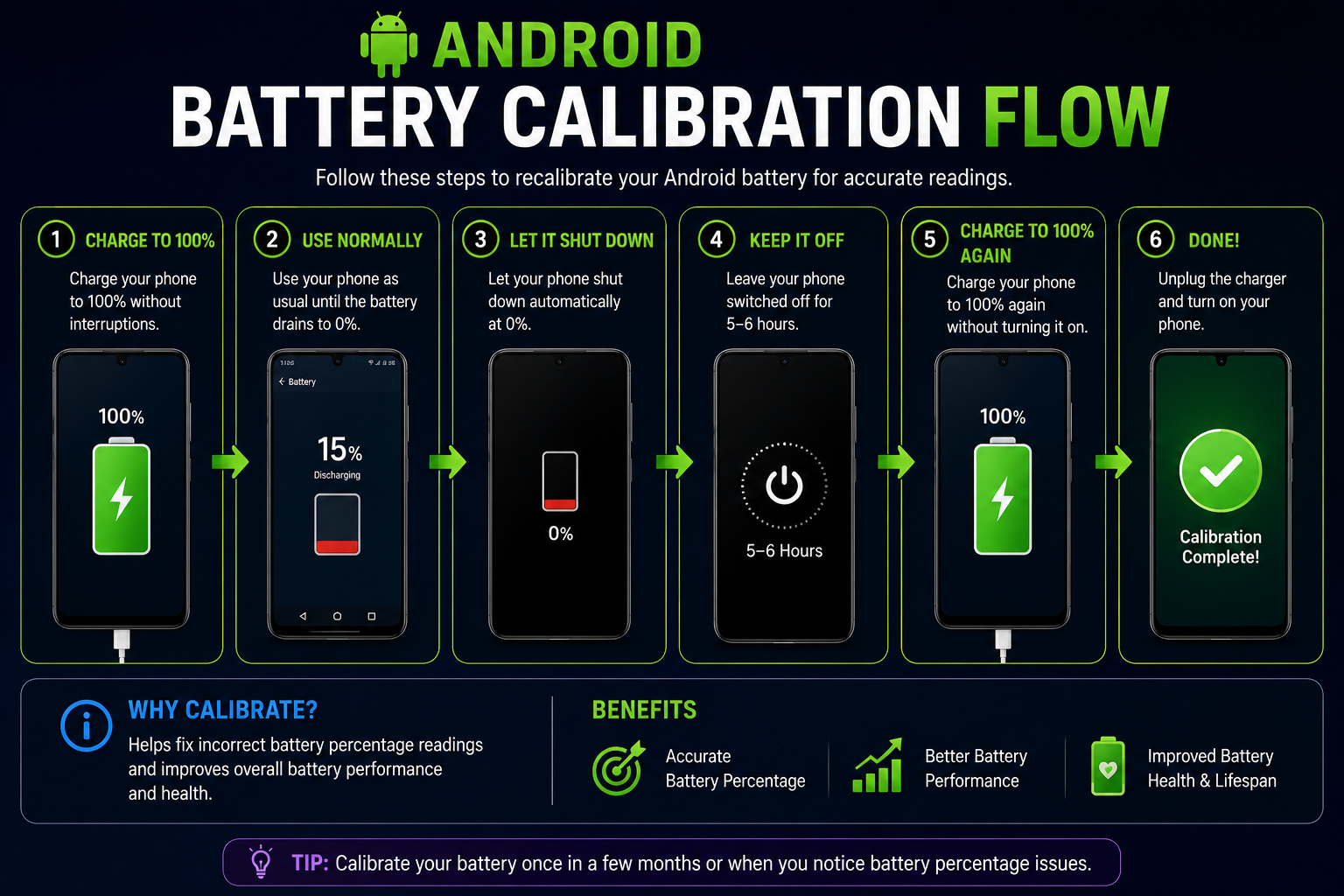
The objective is not to repair the battery but to allow Android's Battery Management System to observe one complete charge cycle and rebuild its estimate.
Perform this procedure only once if necessary. Repeating it frequently provides no additional benefit and may shorten battery lifespan.
What Happens After Calibration?
Successful calibration improves battery percentage accuracy but does not increase battery capacity.
If Android previously estimated battery percentage incorrectly, the battery level should now decrease more smoothly during daily use.
Unexpected shutdowns caused by inaccurate percentage readings may disappear.
The phone should no longer jump suddenly from one battery percentage to another.
Screen-on time usually remains unchanged because calibration does not increase the amount of energy stored inside the battery.
If problems continue after calibration, investigate battery health, charging accessories and background battery usage.
Best Practices to Improve Battery Health
Healthy charging habits have a much greater impact on battery lifespan than battery calibration.
Lithium-ion batteries naturally degrade over time. Although this ageing process cannot be stopped completely, healthy charging habits can slow it considerably.
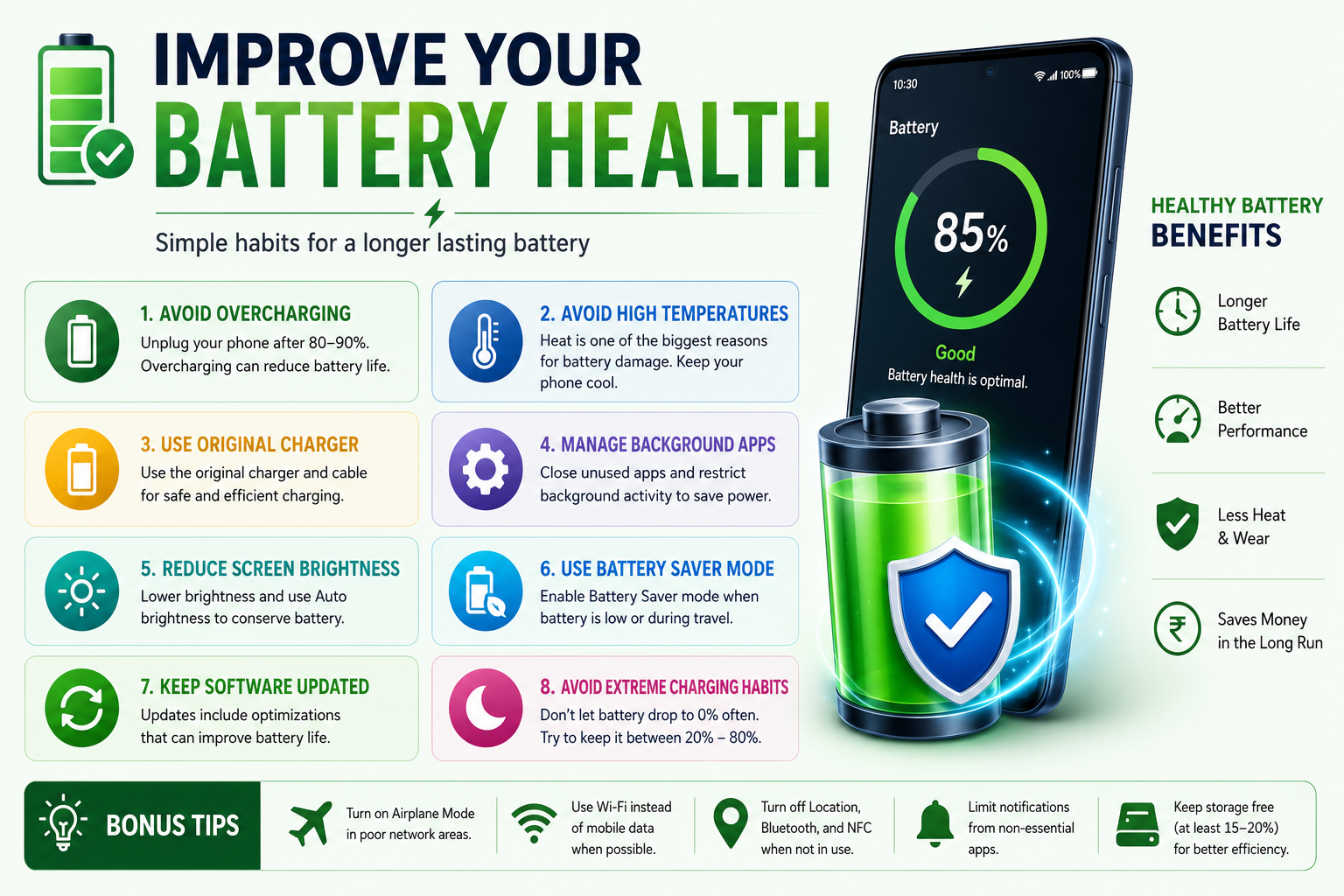
Heat is one of the biggest factors affecting long-term battery health. Avoid exposing the phone to direct sunlight or leaving it inside a hot vehicle.
Modern Android manufacturers include battery protection features such as Adaptive Charging, Battery Protection and Optimized Charging. Keeping these features enabled reduces unnecessary battery stress.
Frequent short charging sessions are perfectly safe for lithium-ion batteries and generally healthier than repeatedly draining the battery completely.
Battery Protection Features by Android Brand
Most Android manufacturers include battery protection features that reduce battery ageing automatically.
Although Android battery calibration works similarly across manufacturers, battery protection features differ between brands.
Many phones intentionally delay charging to 100% overnight or stop charging around 80% depending on user settings. This behaviour is normal and helps preserve long-term battery health.
Do Battery Calibration Apps Really Work?
Most battery calibration apps cannot repair your battery or increase battery capacity because Android no longer allows third-party apps to modify battery statistics.
Searching the Google Play Store for 'Battery Calibration' returns many applications claiming to improve battery life with a single tap. These claims are misleading.
Older Android versions allowed limited access to battery statistics, but modern Android releases protect battery management data. Third-party applications cannot modify the Battery Management System or rewrite battery calibration information.
Most battery calibration apps simply display useful information such as battery temperature, charging current, voltage, estimated health and charging history.
Some applications can notify you when charging reaches a certain percentage or help monitor charging speed, but none can physically repair battery cells or restore lost capacity.
If an application promises to increase battery health, double battery life or restore worn-out batteries, treat those claims with caution.
Signs Your Battery Needs Replacement Instead of Calibration
Some battery problems are physical rather than software-related. In these situations, calibration will not solve the problem.
Every lithium-ion battery gradually loses capacity with age. Eventually, battery runtime becomes noticeably shorter even though Android reports battery percentage correctly.
Battery replacement should be considered when the battery has degraded significantly or develops physical damage.
Repeated calibration cannot repair damaged battery cells. Continuing to use a defective battery may increase the risk of overheating or unexpected shutdowns.
If your phone has become several years old and battery life has steadily declined despite software optimization, replacing the battery is often the most effective solution.
How to Check Battery Health
Checking battery health helps determine whether calibration is worthwhile or whether battery replacement is the better solution.
Battery health indicates how much of the original battery capacity remains. Unlike battery percentage, battery health decreases permanently over time due to normal chemical ageing.
Some manufacturers include built-in battery diagnostics, while others provide battery information through support applications.
If battery health is already significantly reduced, calibration will improve only the displayed percentage—not the actual battery runtime.
Checking battery health before troubleshooting prevents unnecessary calibration attempts.
Battery Calibration vs Battery Drain
Battery drain and incorrect battery percentage are completely different issues and require different solutions.
Many users perform battery calibration because their phone loses charge quickly. In reality, battery calibration does not reduce actual power consumption.
Battery drain refers to energy consumed by the display, processor, mobile network, GPS, Bluetooth, Wi-Fi, background applications and other hardware.
Battery calibration only affects how Android estimates the remaining battery percentage.
If your phone loses 25% overnight because of background apps or weak network coverage, calibration will not improve battery life.
Understanding this difference helps avoid unnecessary deep discharge cycles.
Long-Term Battery Care Tips
Healthy charging habits protect battery lifespan much more effectively than battery calibration.
The lifespan of a lithium-ion battery depends primarily on temperature, charging voltage and the total number of charge cycles.
Reducing heat exposure is one of the most effective ways to preserve battery health. Avoid leaving your phone in direct sunlight or inside a parked vehicle.
Using certified chargers and enabling built-in battery protection features helps reduce unnecessary battery stress.
Rather than worrying about battery calibration, focus on healthy charging habits every day.
Final Recommendations
Battery calibration is a troubleshooting tool—not routine maintenance.
Modern Android phones rarely require manual battery calibration because Battery Management Systems continuously improve battery estimation during everyday use.
If battery percentage becomes inaccurate after a software update, battery replacement or long period of storage, performing one safe calibration cycle may help.
Calibration cannot repair battery ageing, increase battery capacity or improve battery health.
Healthy charging habits, keeping Android updated and monitoring battery health provide much greater long-term benefits than repeated calibration.
Frequently Asked Questions
Does Android battery calibration improve battery life?
No. It only improves battery percentage accuracy.
How often should I calibrate my Android battery?
Only when the battery percentage becomes clearly inaccurate.
Can battery calibration restore battery health?
No. Battery health cannot be restored through software.
Should I discharge my battery to 0% every month?
No. Frequent deep discharges reduce lithium-ion battery lifespan.
Can battery calibration fix battery drain?
No. Battery drain is usually caused by apps, hardware or battery ageing.
Do battery calibration apps really work?
They can monitor battery information but cannot recalibrate or repair modern Android batteries.
When should I replace my Android battery?
Replace it if it swells, overheats, shuts down unexpectedly or has significantly degraded battery health.
Can fast charging damage battery calibration?
No. Modern fast charging systems are managed safely by the Battery Management System.
Related Reading on Godealio
More Guide Details
Featured
true
Author
Name
Godealio Editorial Team
Type
Organization
Url
https://godealio.com/about
Images
Role
hero
Path
/images/guides/battery-calibration.png
Alt
Android phone showing the battery calibration process
Role
section
Path
/images/guides/check-battery-health.png
Alt
Checking Android battery health before calibration
Role
section
Path
/images/guides/battery-calibration-flow.png
Alt
Safe Android battery calibration flow
Role
section
Path
/images/guides/battery-calibration-myths.png
Alt
Android battery calibration myths and facts
Role
section
Path
/images/guides/improve-battery-health.png
Alt
Best practices for improving Android battery health
Diagnostic Summary
Test
Battery Percentage Accuracy
Purpose
Check whether the percentage drops suddenly, freezes or changes after restarting.
Test
Battery Health
Purpose
Determine whether the battery has physically degraded.
Test
Charging Behaviour
Purpose
Verify whether charging progresses consistently from low battery to full.
Test
Unexpected Shutdown Test
Purpose
Check whether the phone powers off while still displaying remaining charge.
Test
Battery Usage Analysis
Purpose
Identify applications or services causing actual battery drain.
Test
Temperature Check
Purpose
Confirm that the battery is not overheating during use or charging.