
Samsung Galaxy Phones Finally Get a Built-In Network Speed Indicator With One UI 9
Samsung is bringing a long-requested network speed indicator to Galaxy devices through One UI 9, allowing users to monitor real-time upload and download activity directly from the status bar.
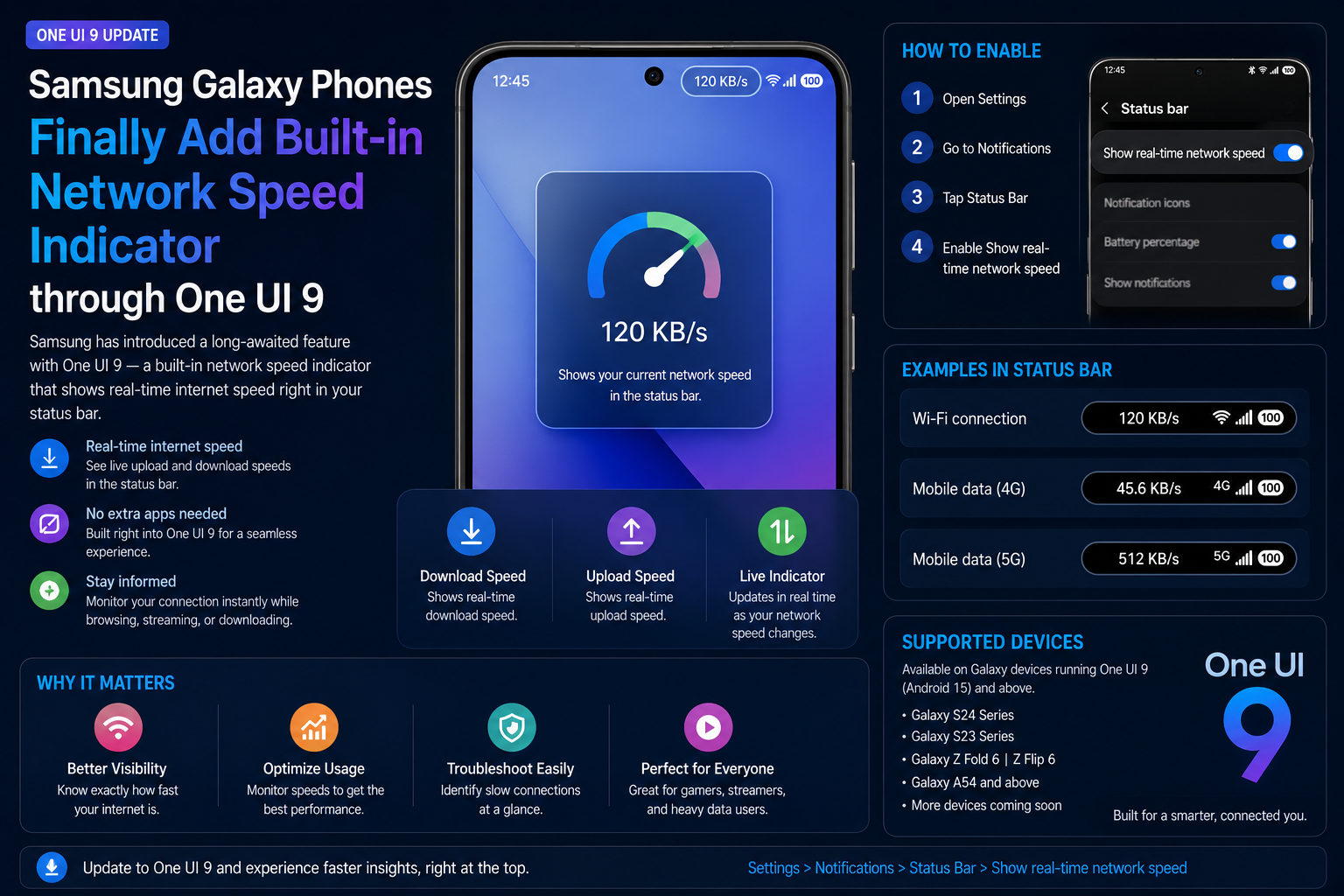
Samsung is finally introducing one of Android's most requested utility features to Galaxy smartphones. Through One UI 9 and Samsung's Good Lock QuickStar module, users can now display real-time internet speed directly in the status bar. The feature shows current upload and download activity without requiring third-party applications, making it easier to monitor Wi-Fi performance, mobile data usage, downloads, streaming quality and network stability. Many competing Android brands have offered similar functionality for years, making this a highly anticipated addition for Galaxy users. The feature is currently appearing in One UI 9 beta releases and is expected to expand to more Samsung devices as the rollout progresses throughout 2026.
Brand
Samsung
Model
Galaxy Network Speed Indicator
Topic
Samsung One UI 9
Content Type
news
Launch Status
Beta Rollout
Availability
Expected Global Availability Through One UI 9
Rating
9.1
Pros
- Displays real-time network speed in the status bar
- No third-party apps required
- Useful for Wi-Fi and mobile data monitoring
- Integrated directly into Samsung's ecosystem
- Helps identify network issues quickly
- Useful for gaming, streaming and downloads
- Lightweight implementation through QuickStar
- Long-requested feature finally arrives on Galaxy devices
Cons
- Currently tied to Good Lock QuickStar
- Limited beta availability initially
- May not arrive on every older Galaxy device
- Regional rollout timing may vary
Final Verdict
Samsung is finally addressing one of the most common requests from Galaxy users. The built-in network speed indicator is a small feature on paper, but it significantly improves everyday usability. Combined with One UI 9's broader refinements, it makes Samsung's software experience more competitive with other Android manufacturers that have offered similar functionality for years.
Samsung Finally Brings a Native Network Speed Indicator
For years, Galaxy users relied on third-party applications to monitor internet speed directly from the status bar. Samsung is finally addressing that gap through One UI 9.
The new feature allows users to view real-time upload and download speeds while browsing, gaming, streaming videos, downloading files or using mobile data.
The indicator integrates directly into Samsung's user interface, providing a cleaner and more reliable experience than external apps.
How the Feature Works
The network speed indicator continuously monitors active network traffic and displays live transfer rates in the status bar.
Users can quickly identify slow internet connections, background downloads or unexpected data usage without opening additional applications.
The feature updates automatically and remains visible while using apps, making it particularly useful during streaming, cloud backups and online gaming.
- Real-time upload monitoring
- Real-time download monitoring
- Status bar integration
- Minimal battery impact
- Works with Wi-Fi and mobile data
- No third-party software required
How to Enable the Network Speed Indicator
Samsung currently provides access through Good Lock's QuickStar customization module.
The setup process only takes a few moments once Good Lock is installed.
- Install Good Lock from Galaxy Store
- Open QuickStar module
- Navigate to Visibility Settings
- Enable Network Speed Indicator
- Allow Status Bar Display
- View real-time internet speeds instantly
Expected Supported Galaxy Devices
Samsung has not released a final compatibility list, but devices receiving One UI 9 are expected to gain access to the feature.
Flagship models are likely to receive support first before expanding to additional Galaxy devices.
- Galaxy S26 Series
- Galaxy S25 Series
- Galaxy S24 Series
- Galaxy Z Fold 8
- Galaxy Z Flip 8
- Future One UI 9 Compatible Devices
Why Galaxy Users Have Been Asking for This
Many Android manufacturers have offered built-in internet speed monitoring for years, making its absence on Galaxy phones increasingly noticeable.
A native implementation improves reliability, reduces battery consumption and removes the need for third-party apps that can display ads or request additional permissions.
- Monitor Wi-Fi quality instantly
- Track mobile data performance
- Check download speeds
- Identify slow connections
- Useful during gaming sessions
- Helpful for video streaming
- Cleaner Samsung experience
Why This Matters in One UI 9
Although it is a relatively small feature compared with AI tools or camera upgrades, it improves everyday usability significantly.
Network speed visibility helps users make faster decisions when troubleshooting connectivity issues or switching between Wi-Fi and mobile networks.
It also demonstrates Samsung's willingness to adopt community-requested features as One UI continues to evolve.
Could Samsung Integrate It Directly Into One UI?
Many Galaxy users hope Samsung eventually moves the feature out of Good Lock and into standard One UI settings.
If adoption is strong during the beta period, future One UI releases could integrate the indicator directly into the core operating system.
A Small Feature With Big Everyday Value
The network speed indicator may not be the most exciting One UI 9 feature, but it is one that users will see every day.
By adding native internet speed monitoring, Samsung closes another gap with competing Android brands and delivers a cleaner experience for Galaxy owners.
FAQs
What is Samsung's new network speed indicator?
It is a feature that displays real-time upload and download speeds directly in the Galaxy phone status bar.
Do I need a third-party app anymore?
No. Samsung's implementation provides native network speed monitoring without requiring external applications.
How do I enable the feature?
Install Good Lock from Galaxy Store, open QuickStar and enable the Network Speed Indicator option.
Does it show both upload and download speeds?
Yes. The feature can display live upload and download activity.
Will older Galaxy devices receive it?
Availability depends on One UI 9 eligibility and Samsung's final rollout plans.
Is the feature available globally?
The rollout is expected to expand globally as One UI 9 becomes available across supported regions.
Can it help troubleshoot slow internet?
Yes. Users can instantly verify whether slow performance is caused by the network connection.
Does it affect battery life?
Samsung's native implementation is expected to be more efficient than many third-party monitoring apps.