
Android 17 Gets a Smarter Media Switcher, and It Already Feels Better Than the Old Carousel
Google is improving Android’s media output experience with a cleaner, faster, and more useful switcher for speakers, earbuds, TVs, and smart devices.
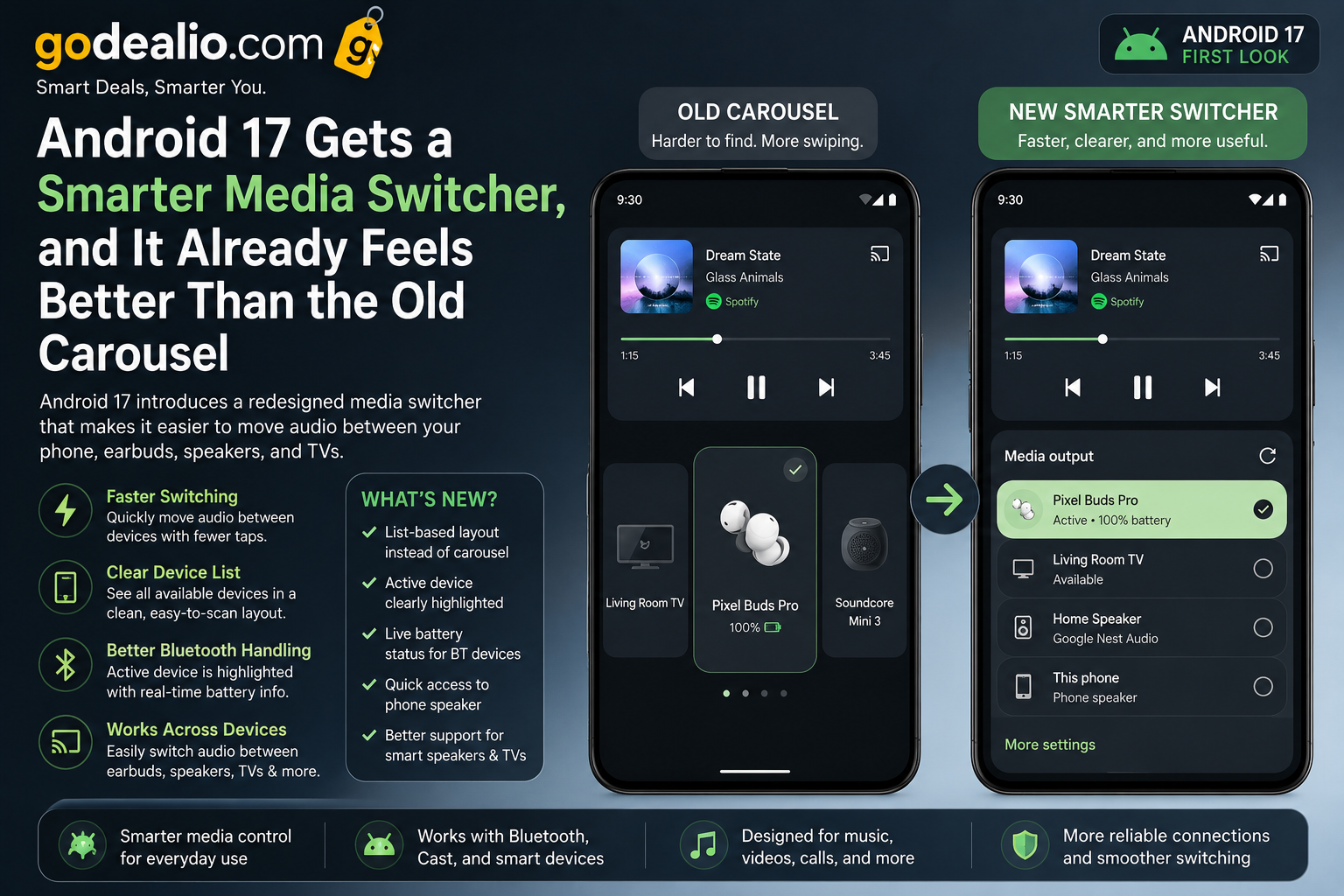
Android 17 introduces a redesigned media switcher that feels more practical than the older carousel layout. The updated interface makes it easier to move audio between Bluetooth earbuds, phone speakers, smart TVs, and connected speakers with fewer taps and clearer device controls.
Brand
Model
Android 17 Media Switcher
Launch Status
Developer preview / beta feature
Availability
Expected with Android 17 rollout
Rating
8.6
Specification Highlights
Label
Feature
Value
Smarter media switcher
Label
Platform
Value
Android 17
Label
Old UI
Value
Carousel-style output picker
Label
New Focus
Value
Faster device switching
Label
Supported Devices
Value
Phone speaker, Bluetooth earbuds, speakers, TVs
Label
User Benefit
Value
Clearer media routing
Pros
- Cleaner media output selection
- Feels faster than the old carousel
- Better handling for Bluetooth devices
- Easier switching between phone, earbuds, speakers, and TVs
- More useful layout for connected devices
- Improves daily media control experience
Cons
- Still depends on device and app support
- Final design may change before stable release
- Some OEM skins may modify the experience
- Older Android devices may not receive the feature
Final Verdict
Android 17’s smarter media switcher is a small but meaningful usability upgrade. It may not be the flashiest Android feature, but it directly improves a daily action many users perform often: moving audio between earbuds, speakers, TVs, and the phone itself.
Android 17 Improves Media Switching
Android 17 is getting a smarter media switcher, and the early experience already feels better than the older carousel-based design.
The new interface focuses on making media output controls easier to understand, especially when multiple Bluetooth and smart devices are connected.
For users who regularly switch between earbuds, phone speakers, smart TVs, and Bluetooth speakers, this could become one of the most useful quality-of-life upgrades in Android 17.
What Changed in the New Media Switcher
The older media carousel could feel cluttered when several devices were nearby or already connected.
Android 17 appears to simplify that experience by presenting available audio outputs in a clearer and more practical layout.
Instead of forcing users to swipe through a carousel, the updated design makes device selection feel more direct.
- Cleaner list-style device selection
- Faster access to active media output
- Improved visibility for available devices
- Better layout for connected Bluetooth accessories
Why It Feels Better Than the Old Carousel
The old carousel was visually simple, but it was not always the fastest way to switch output devices.
Android 17’s new media switcher feels more functional because users can quickly identify where audio is playing and where it can be moved next.
This matters most when switching between wireless earbuds, car Bluetooth, smart speakers, and Cast-enabled devices.
- Less swiping
- Clearer device names
- Better active-device indication
- More predictable behavior
Real-World Daily Usage
This feature is especially useful during common situations like switching from earbuds to phone speaker, moving music to a smart speaker, or changing audio output during a video call.
It also helps users who own multiple Bluetooth devices and often struggle to know which one is currently active.
The change may feel small, but it improves a task that many Android users perform every day.
- Useful for YouTube, Spotify, Netflix, and podcasts
- Helpful when moving audio to speakers or TVs
- Better for Bluetooth-heavy users
- Makes media control feel less confusing
Better Bluetooth and Smart Device Handling
The new switcher should make Bluetooth device management easier by showing active and available devices more clearly.
Users may find it easier to move audio from earbuds to a speaker without opening full Bluetooth settings.
For smart home users, this also improves the connection between Android phones, speakers, and TVs.
Apps That Benefit Most
Music, video, podcast, and streaming apps will benefit the most from the redesigned media switcher.
Apps like Spotify, YouTube Music, YouTube, Netflix, Prime Video, and podcast players could feel smoother when switching playback devices.
The improvement is not limited to entertainment apps; it can also help during calls, meetings, and screen casting.
- Spotify and YouTube Music
- YouTube and Netflix
- Podcast apps
- Video meeting apps
- Casting and smart TV playback
Pixel and Android Users
Google Pixel phones will likely get the cleanest version of the Android 17 media switcher first.
Other Android brands such as Samsung, OnePlus, Xiaomi, Vivo, Oppo, and Motorola may customize the interface through their own skins.
The core idea should remain the same: faster and clearer media output switching.
Limitations to Watch
Because Android 17 is still in development, the final design may change before stable release.
Device compatibility may also vary depending on Bluetooth accessories, Cast support, and OEM software customization.
Some older phones may not receive Android 17, so this improvement may be limited to newer devices.
Why This Feature Matters
Android updates are not only about big AI features or design changes. Small improvements like media switching can make the phone feel better every day.
The new media switcher shows Google is paying attention to practical usability rather than only adding headline features.
For users with earbuds, speakers, smart TVs, and cars connected to one phone, this is a genuinely useful upgrade.
Is This a Big Android 17 Upgrade?
The smarter media switcher alone is not a reason to upgrade, but it adds to Android 17’s overall polish.
If Android 17 continues improving daily controls, notifications, privacy, battery, and AI features, the update could feel more refined than Android 16.
For now, this media switcher looks like one of the better small usability changes in Android 17.
FAQs
What is the new Android 17 media switcher?
It is an updated media output control that helps users switch audio between phone speakers, Bluetooth earbuds, speakers, TVs, and other connected devices more easily.
How is it better than the old carousel?
The new layout appears cleaner and more direct, reducing the need to swipe through devices in a carousel.
Will all Android phones get the new media switcher?
It depends on Android 17 update availability and how each phone brand customizes the software.
Which apps will benefit from this feature?
Music, video, podcast, calling, and casting apps such as Spotify, YouTube Music, YouTube, Netflix, and meeting apps may benefit.
Is Android 17 available now?
Android 17 is expected to roll out first through developer previews or beta builds before reaching stable devices.